Edit your WP categories by asking
A free plugin adds a chat to your WP dashboard. Type “Rename my News category to Studio news.” Nothing changes until you press the button.
Tried on renaming and adding categories, not on tags.
Needs WP 6.3 to 7.1 and PHP 8.0 or newer. What it installs
Needs WP 6.3 to 7.1, PHP 8.0 or newer, and an administrator login. One site per install.
The download is a plugin. Turning it on connects your site to cmshands.com and adds 3 small rescue files. Deleting the plugin removes them and everything it stored. What we send
Plugins are installed from a computer. Get the plugin here instead
- Nothing changes without your OK
- Undo in one click, or a warning first
- No account, no password to share
What it does here
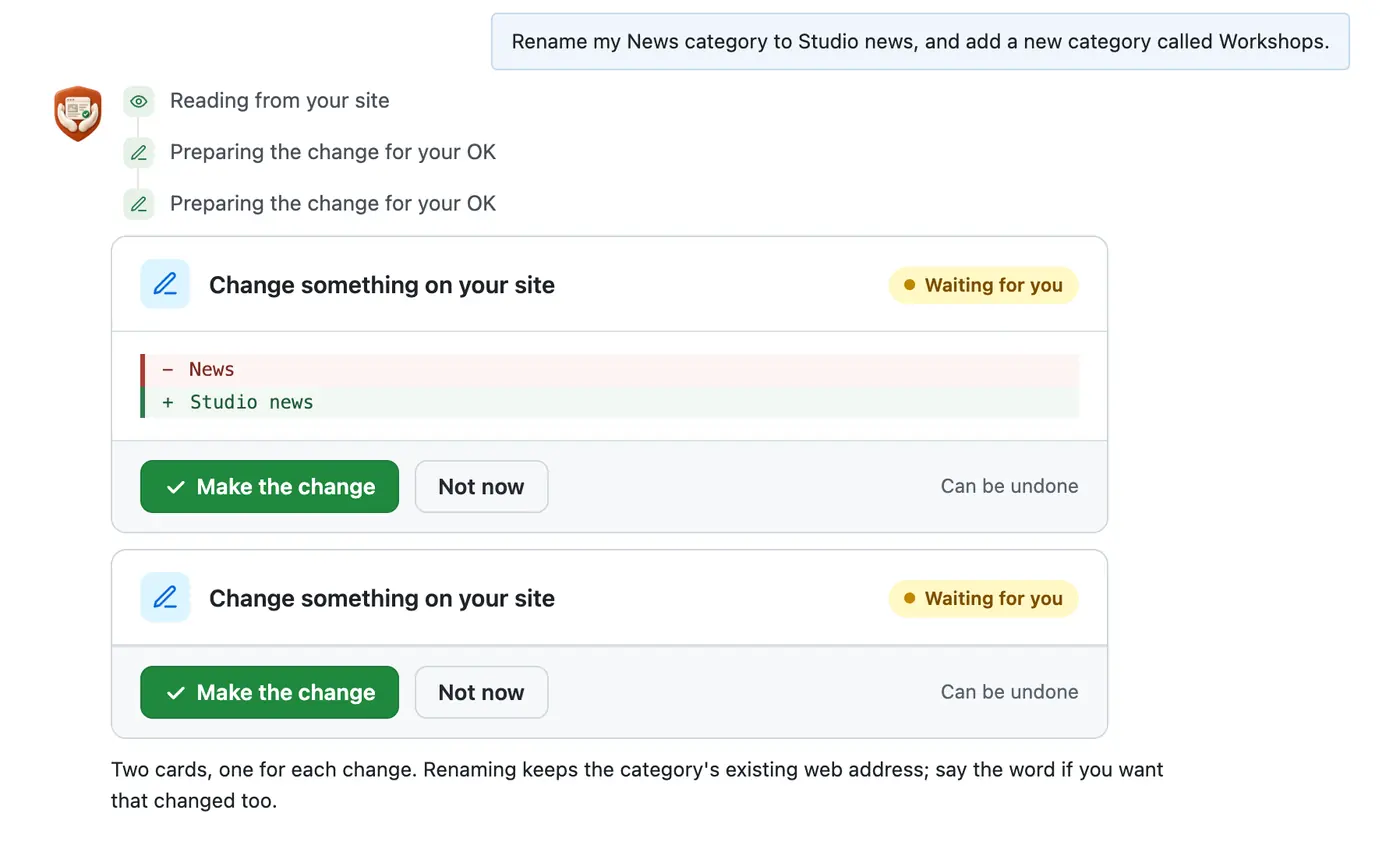
- It renames a category or adds a new one when you ask in plain words, one card per change.
- The rename card showed the old name, News, and the new one, Studio news, before we pressed anything.
- Renaming kept the web address, /category/news/, so links to it still work. It told us so first.
More it does here (2)
- After each change it checked the site and said what it found: “it now says ‘Studio news’.”
- In our test run on Oct 14, 2026, both cards were ready within 6 seconds of the request.
How to edit categories in WordPress yourself
Checked on WP 7.1, Oct 14, 2026
1. In your dashboard (the screens you log in to at yoursite.com/wp-admin), go to Posts › Categories.
2. Click the name of the category you want to rename. Its Edit Category screen opens.
3. Type the new name in the Name box.
4. Leave Slug as it is. The slug is the end of the category's web address, so old links keep working.
5. Press Update. WP shows “Category updated.” at the top of the screen.
6. To add a category, go back to Posts › Categories and type its name under Add Category, on the left.
7. Press the Add Category button. The new category shows in the list on the right.
Renaming changes the name only. The web address, like /category/news/, stays the same unless you change the Slug too. In our run on our test site (a WP site we run to try every task before we write about it), CMSHands said so before we pressed.
Why it won't wreck your site
- Nothing changes until you press the button. Every change comes as a card that names it. Nothing happens until you press the button or Not now.
What it won't do here
- TagsWe tried it on categories only. Tags work the same way in WP, but we haven't tested them in the chat.
- Deleting a categoryWe haven't tried deleting one. Any delete is one-way, and the card says so before you press.
- Adding a category to your menuA new or renamed category doesn't appear in your site's menu on its own. We haven't tested menu changes in the chat.
- Moving posts between categoriesWe haven't tested putting posts into a category from the chat. Do that in each post's settings for now.
Questions
How do I edit categories in WordPress?
Go to Posts › Categories in your dashboard and click the category's name. Change the Name, leave the Slug alone to keep its web address, and press Update. To add one, type a name under Add Category on the same screen and press the Add Category button.
Can I rename Uncategorized?
Yes. Uncategorized is WP's default category, and you rename it like any other under Posts › Categories. WP won't let you delete it while it's the default. To pick a different default, go to Settings › Writing and change Default Post Category.
What happens to posts when I delete a category?
They stay published. A post left with no category moves into your default category, usually Uncategorized. A post that sits in other categories too only loses the one you deleted. WP can't undo a delete, so rename a category when you can.
Are store product categories the same thing?
No. A store plugin keeps product categories apart from post categories, under Products › Categories. That screen works the same way: click a name to edit it, or add one on the left. We haven't tried product categories in the chat yet.
Can I undo a category change made in the chat?
We haven't tested that yet. In our test run, both cards read “Can be undone” and had an Undo button, but we didn't press it. A rename is easy to reverse by hand: open the category under Posts › Categories and type the old name back.
Is it free?
To start, yes: 3 changes with no account, then 10 a month once you add your email. Questions are free, up to 30 a day.
Written by CMSHands team.
Try it on your own categories
- Nothing changes without your OK
- Undo in one click, or a warning first
- No account, no password to share
Free to startNo account: 3 to try itWith your email: 10 every monthWhat's free