
Update WP plugins safely, by asking
A free plugin adds a chat to your WP dashboard. Type “Update Contact Form 7 and check my site after.” Press the button. Broken site? The old version goes back.
Plugins from the WP plugin directory. Not premium plugins.
- Nothing changes without your OK
- Undo in one click, or a warning first
- No account, no password to share
Needs WP 6.3 to 7.1, PHP 8.0 or newer, and an administrator login. One site per install.
The download is a plugin. Turning it on connects your site to cmshands.com and adds 3 small rescue files. Deleting the plugin removes them and everything it stored. What we send
Update Contact Form 7 and check my site after.

Watch it do this on a real site
When it works

You ask
You type it in the chat in your WP dashboard. You don't need the new version number, and you don't have to open the Plugins screen.
Update Contact Form 7 and check my site after.
You see it first
It listed the site's plugins and found the newest release. About 5 seconds after the request, a card showed the change: 6.1.7 out, 6.2.1 in. Nothing on the site had changed yet.
Ready for you to review — 6.2.1 is the newest release but hasn't been tried on your site yet; if anything breaks after the change, 6.1.7 goes back on its own. Your form and its saved entries stay as they are.
- 2 secondsListing your plugins and themes
- 3 secondsPreparing the change for your OK

You press the button
Only now does it touch the site. It checked the site first, put 6.2.1 in, then checked the site again. That last check took about 5 seconds.
- 11 secondsChecking your site before the change
- 12 secondsUpdating Contact Form 7 to 6.2.1
- 13 secondsChecking your site

Updated and checked
The home page, the login page and the dashboard loaded as they did before, so 6.2.1 stayed. The card turned green with an Undo link that would put 6.1.7 back. We didn't press it this time.
Contact Form 7 is now on 6.2.1. I checked your homepage, login page and admin afterwards, and they load as they did before.
A real run on our test site, Quillmoor Pottery (WP 7.1.3, Twenty Twenty-Four), Oct 10, 2026. From asking to done, it took 17 seconds.
When an update breaks the site

You press the button
We broke version 6.2.1 on purpose for this run, and set the plugin back to 6.1.7 first. Same request, same card. After the press it checked the site, put 6.2.1 in and started checking again.
- 14 secondsChecking your site before the change
- 16 secondsUpdating Contact Form 7 to 6.2.1
- 17 secondsChecking your site

The old version goes back
The check found errors. It waited 15 seconds and checked again, then put 6.1.7 back on its own, with no press from you. A minute later the chat also said “Your site is reporting a crash. A person at CMSHands is on it.”: the errors had been reported too, though 6.1.7 was already back.
- 55 secondsPutting Contact Form 7 6.1.7 back
Contact Form 7 6.2.1 broke your site when I checked it, so I put 6.1.7 back straight away. It is running 6.1.7 again.
We broke the update on purpose. A real run on our test site, Quillmoor Pottery (WP 7.1.3, Twenty Twenty-Four), Oct 10, 2026. From asking to done, it took 55 seconds.
That's the whole job. The plugin is free: 3 changes to try it, no account. Nothing changes until you press the button.
Needs WP 6.3 to 7.1, PHP 8.0 or newer, and an administrator login. One site per install.
The download is a plugin. Turning it on connects your site to cmshands.com and adds 3 small rescue files. Deleting the plugin removes them and everything it stored. What we send
How to update a plugin in WordPress yourself
Checked on WP 7.1, Oct 11, 2026
1. In your dashboard, point at Plugins in the menu. The number beside it is how many plugins have an update waiting.
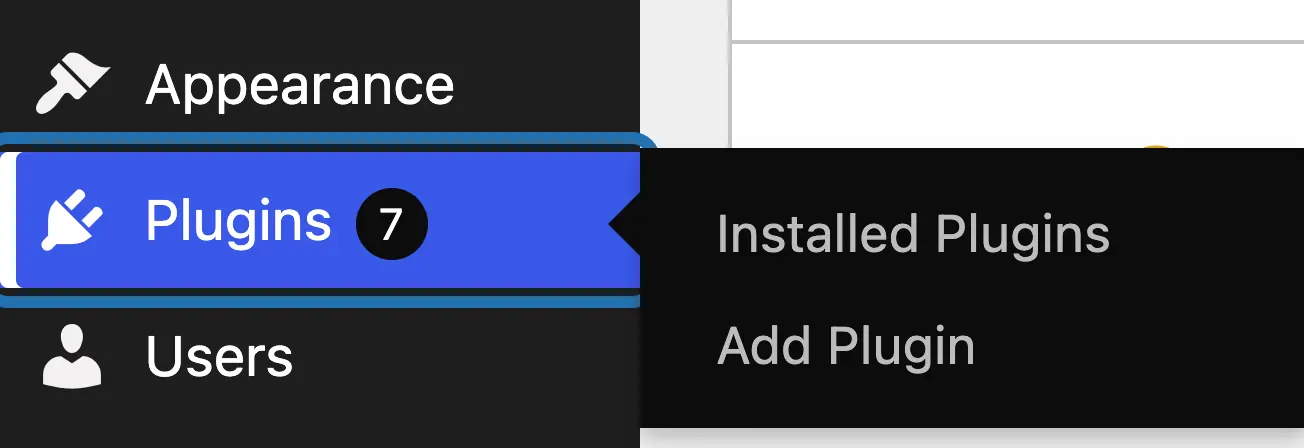
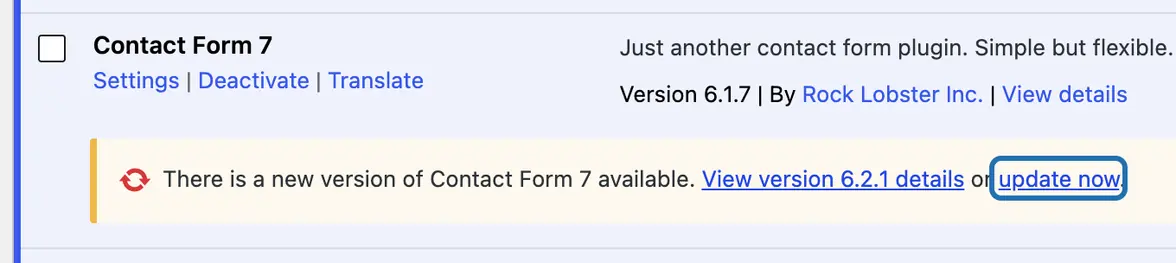
2. Click Installed Plugins. Under each plugin with an update, WP shows a yellow line: “There is a new version … available.”
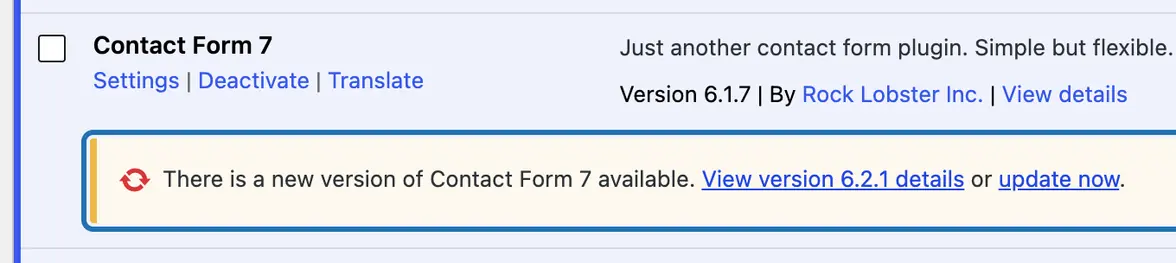
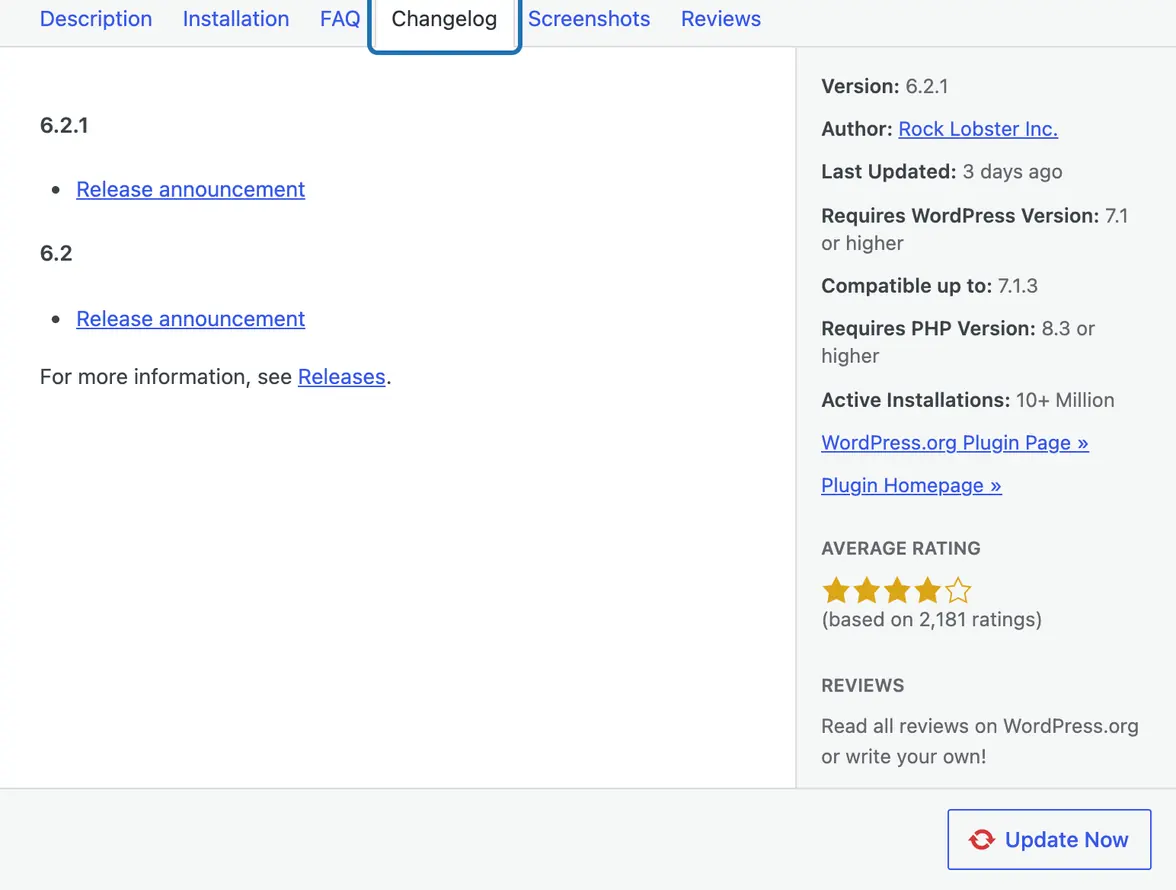
3. Click View version 6.2.1 details in that line. It opens on the Changelog, with the WP and PHP versions it needs on the right.
4. Note the version you have now, under the plugin's description: here Version 6.1.7. You'll need it if you have to go back.
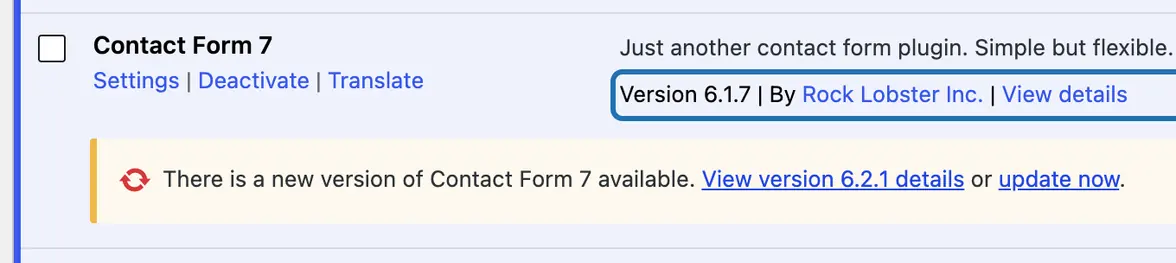
5. Click update now in the yellow line. Stay on the page until the line says Updated!
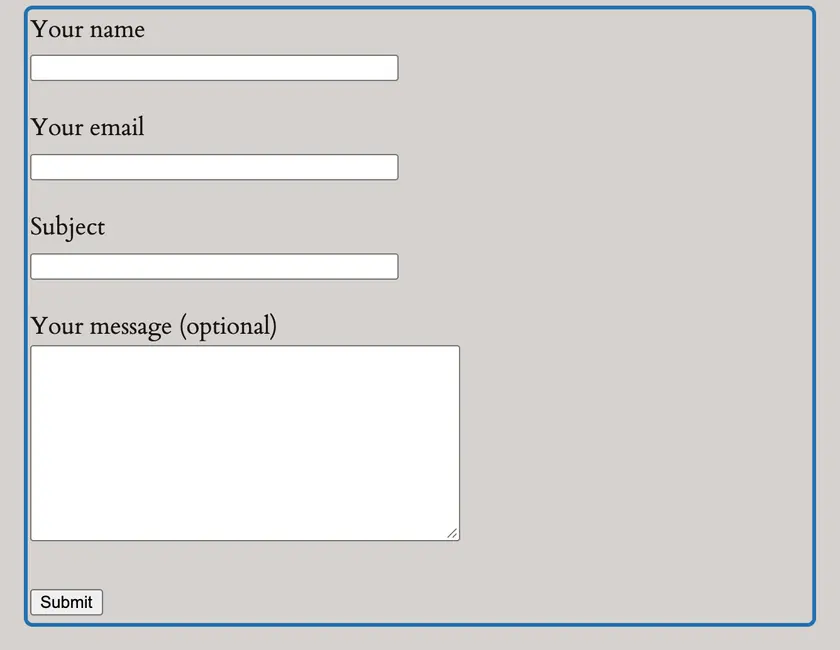
6. Open your site in a new tab. Check the home page, then the page the plugin works on: here, send a test message.
7. If it broke, download the old version from the plugin's wordpress.org page, then upload it at Plugins › Add Plugin › Upload Plugin.



Older versions of a plugin are on its wordpress.org page, under Advanced View. If your dashboard won't load at all after an update, rename that plugin's folder in wp-content/plugins with your host's file manager: WP then switches it off.
What it won't do here
Plugins from the WP plugin directory only
A switched-off plugin isn't checked
One plugin per card
Not WP itself, and not themes
Hosts that lock plugin files
Why it won't wreck your site
Nothing changes until you press the button.
Updates put themselves back.
One click undoes it.
Free to start
| No account | With your email | Paid plan | |
|---|---|---|---|
| Changes | 3 to try it | 10 every month | Coming. Nothing costs money until you choose it. |
| Questions | 30 a day | 100 a day | |
| If it breaks | Daily check and crash rescue | The same, plus email alerts |
Undo a change within 24 hours and it doesn't count. If you haven't added an email after 30 days, only crash rescue stays on until you add one. A change is one card you approve. A job that touches several pages or plugins is several changes.
Questions
How do I update a plugin in WordPress?
Go to Plugins in your dashboard. A plugin with an update has a yellow line under it: click update now there and wait for Updated!. Then open your site and check the pages that plugin works on. To do several at once, go to Dashboard › Updates, tick the plugins and press Update Plugins.
What happens if a plugin update breaks my site?
WP keeps the new version, and there's no undo: you put the old one back yourself, as in step 7 above. If CMSHands made the update, it checks your site after and puts the old version back on its own if the site got worse. When we broke an update on purpose, it said: “Contact Form 7 6.2.1 broke your site when I checked it, so I put 6.1.7 back straight away.”
Can I update a plugin manually?
Yes. Download the new version's zip from the plugin's wordpress.org page, or from its maker for a premium plugin. Go to Plugins › Add Plugin › Upload Plugin, choose the zip and press Install Now. WP sees the plugin is already there: press Replace current with uploaded. Use it for a plugin that isn't in the directory, or when update now fails. To go back instead, see how to put an older version back.
Can it update all my plugins at once?
It does them one at a time. Ask “Update all my plugins” and you get one card per plugin, each checked before the next. Each card you approve counts as one of your free changes, so 7 updates use 7 of them.
Is it free?
To start, yes: 3 changes with no account, then 10 a month once you add your email. Updating one plugin is one change. Questions are free, up to 30 a day (100 with your email).
Written by CMSHands team.
Try it on your own plugins
Needs WP 6.3 to 7.1, PHP 8.0 or newer, and an administrator login. One site per install.
The download is a plugin. Turning it on connects your site to cmshands.com and adds 3 small rescue files. Deleting the plugin removes them and everything it stored. What we send
Download the plugin.
It's free: 3 changes to try it. No account, no card.
Upload and activate it.
In your dashboard: Plugins › Add Plugin › Upload Plugin (Add New Plugin on older WP). Choose the file, press Install Now, then Activate Plugin.
Press Turn on.
Press Turn on CMSHands. No account, no key, no password.