
Install a WP plugin by asking
A free plugin adds a chat to your WP dashboard. Type “I need a booking calendar.” It picks a plugin. Press the button to install it, undo in one click.
Plugins from the WP plugin directory, checked against your WP and PHP. What about premium plugins?
- Nothing changes without your OK
- Undo in one click, or a warning first
- No account, no password to share
Needs WP 6.3 to 7.1, PHP 8.0 or newer, and an administrator login. One site per install.
The download is a plugin. Turning it on connects your site to cmshands.com and adds 3 small rescue files. Deleting the plugin removes them and everything it stored. What we send
I need a simple booking calendar. Find a good plugin and install it.

Watch it do this on a real site

You ask
You say what you need in plain words. You don't have to know a plugin's name. This run took two turns, the pick and then your yes, so each part shows its own time.
I need a simple booking calendar. Find a good plugin and install it.

It picks one
It searched the WP plugin directory (the free plugins at wordpress.org) and named one plugin, about 6 seconds after the question. It said how many sites use it, its rating, and that it fits the site's WP and PHP versions (PHP is the language WP runs on; your host sets its version). Then it asked before installing anything.
Events Manager is the one I'd pick — an events calendar and booking system (bookings, appointments, tickets), used on about 60,000 sites, rated 84%, updated three days ago and checked against your WordPress and PHP versions with nothing flagged. Say the word and I'll install and switch it on — installing runs the plugin's code on your site, so I'd rather you confirm first.
- 3 secondsSearching the WordPress plugin directory
You say yes
You reply “Yes, install Events Manager.” About 7 seconds later a card appears: a box in the chat that shows exactly what would change, marked Can be undone. Nothing is installed yet. From here on, times count from your reply.
Ready for you to review.
- 3 secondsSearching the WordPress plugin directory
- 6 secondsPreparing the change for your OK

You press the button
Only now does it install the plugin, from the WP plugin directory. The install itself took about 3 seconds on our test site. Then it checked that the plugin was there.
- 12 secondsInstalling a plugin
- 15 secondsChecking the change

It's installed
The card turns green, with an Undo link. Events Manager was installed and switched on. As it switched on, it made 5 pages of its own: Events, Locations, Categories, Tags and My Bookings.
Done. I checked afterwards, and the change is in place.

Undo, if you want
One press of Undo switched the plugin off and deleted it, and Events Manager was gone from the plugin list. The 5 pages it made and its settings stayed on the site. Delete those pages yourself in Pages.
Undone. I checked afterwards, and it's back the way it was.
- 21 secondsReverting the change
- 22 secondsChecking the change
A real run on our test site, Quillmoor Pottery (WP 7.1.3, Twenty Twenty-Four), Oct 11, 2026.
That's the whole job. The plugin is free: 3 changes to try it, no account. Nothing changes until you press the button.
Needs WP 6.3 to 7.1, PHP 8.0 or newer, and an administrator login. One site per install.
The download is a plugin. Turning it on connects your site to cmshands.com and adds 3 small rescue files. Deleting the plugin removes them and everything it stored. What we send
How to install a WordPress plugin yourself
Checked on WP 7.1, Oct 11, 2026
1. In your dashboard (yoursite.com/wp-admin), go to Plugins › Add Plugin. On older WP versions it may say Add New Plugin or Add New.
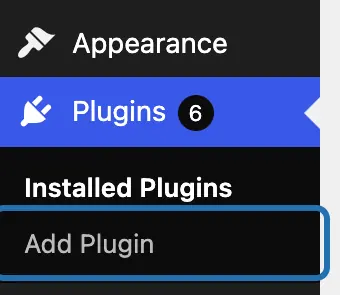
2. Click the Search Plugins box and type what the plugin should do, like booking calendar. The results load below it.

3. Compare a few results. Look at the stars, Active Installations, Last Updated and Compatible with your version of WordPress.
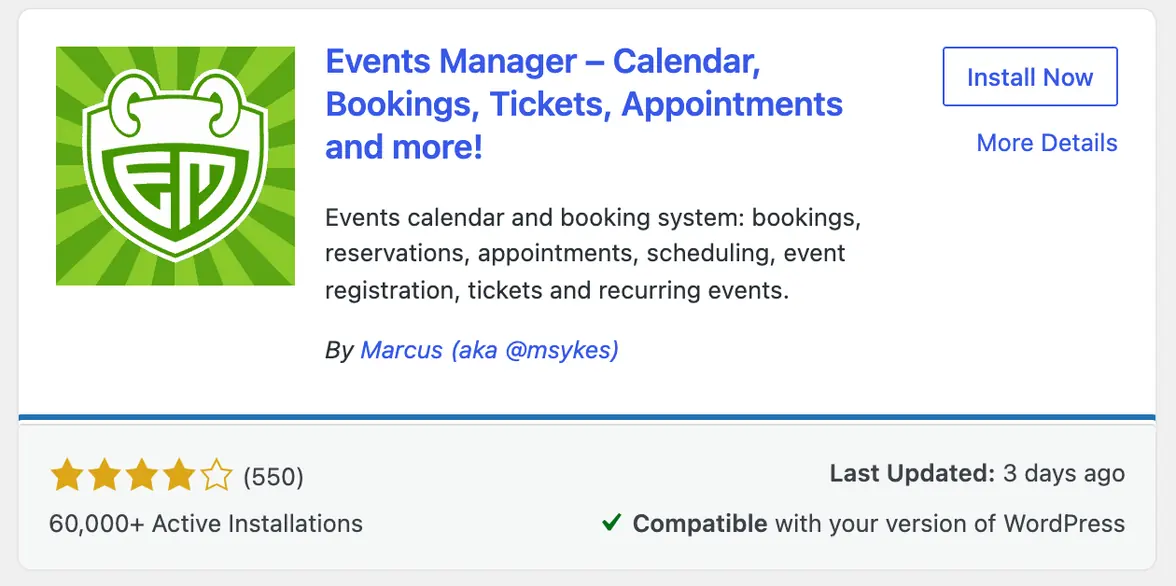
4. Press Install Now on the one you pick. WP fetches it from the WP plugin directory: the free plugins at wordpress.org.

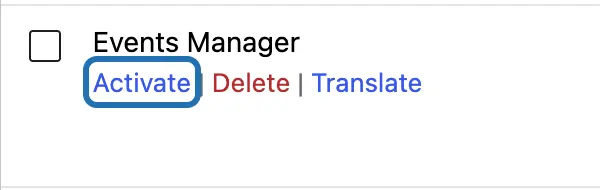
5. When the button turns into Activate, press it. That switches the plugin on. An installed plugin does nothing until it's on.

6. Not ready to switch it on? It waits in Plugins › Installed Plugins. Press Activate under its name when you are.


A plugin is extra code that runs on your site, so add only the ones you need. Once it's on, most plugins add their own menu item or a Settings link, and that's where you set it up. To show a plugin on one page, like a booking form, add its block to that page in the editor.
What it won't do here
Premium plugins and zip files
What a plugin leaves behind
Checking your pages after
Setting the plugin up
Why it won't wreck your site
Asking changes nothing.
Nothing changes until you press the button.
One click undoes it.
Free to start
| No account | With your email | Paid plan | |
|---|---|---|---|
| Changes | 3 to try it | 10 every month | Coming. Nothing costs money until you choose it. |
| Questions | 30 a day | 100 a day | |
| If it breaks | Daily check and crash rescue | The same, plus email alerts |
Undo a change within 24 hours and it doesn't count. If you haven't added an email after 30 days, only crash rescue stays on until you add one. A change is one card you approve. A job that touches several pages or plugins is several changes.
Questions
How do I install a plugin in WordPress?
Go to Plugins › Add Plugin, search for what you need, press Install Now, then Activate. That works for any free plugin from the WP plugin directory, and the steps above show each screen on WP 7.1. With CMSHands you type what you need in the chat instead. It picks a plugin and installs it once you press the button.
How do I install a plugin from a zip file?
Use Upload Plugin. Go to Plugins › Add Plugin, press Upload Plugin at the top, choose the zip file and press Install Now. Then press Activate Plugin. Premium plugins you buy usually come this way. CMSHands can't upload a zip for you: it installs only from the WP plugin directory.
Why can't I see Add Plugin in my dashboard?
Most often your login isn't an administrator, and only administrators can add plugins. Some hosts also switch plugin installs off, and CMSHands can't get around either one. On a multisite network (several sites run from one WP install), only the network admin can add plugins, and CMSHands doesn't work there at all. Ask whoever set up the site, or your host.
How do I pick a good plugin?
Check three things on its card: Last Updated, Active Installations and Compatible with your version of WordPress. One that many sites use and its makers updated recently is a better bet than one nobody has touched in years. CMSHands checks the same things for you, against your WP and PHP versions, and names one pick with its reasons. PHP is the language WP runs on; your host sets its version.
Can I undo installing a plugin?
Yes. Go to Plugins › Installed Plugins, press Deactivate under the plugin, then Delete. With CMSHands, press Undo on the card: in our test run it switched Events Manager off and deleted it. Either way, pages or settings a plugin made can stay. Events Manager's 5 pages did, so look in Pages afterwards.
Is it free?
To start, yes: 3 changes with no account, then 10 a month once you add your email. Installing one plugin is one change. Questions are free, up to 30 a day (100 with your email).
Written by CMSHands team.
Try it with the next plugin you need
Needs WP 6.3 to 7.1, PHP 8.0 or newer, and an administrator login. One site per install.
The download is a plugin. Turning it on connects your site to cmshands.com and adds 3 small rescue files. Deleting the plugin removes them and everything it stored. What we send
Download the plugin.
It's free: 3 changes to try it. No account, no card.
Upload and activate it.
In your dashboard: Plugins › Add Plugin › Upload Plugin (Add New Plugin on older WP). Choose the file, press Install Now, then Activate Plugin.
Press Turn on.
Press Turn on CMSHands. No account, no key, no password.