
Switch off or remove WP plugins safely
A free plugin adds a chat to your WP dashboard. Type “Remove the plugins I don't use, and tell me first which ones and why.” Nothing changes until you press.
Switching off undoes in one click. Deleting can't be undone; it says so.
- Nothing changes without your OK
- Undo in one click, or a warning first
- No account, no password to share
Needs WP 6.3 to 7.1, PHP 8.0 or newer, and an administrator login. One site per install.
The download is a plugin. Turning it on connects your site to cmshands.com and adds 3 small rescue files. Deleting the plugin removes them and everything it stored. What we send
Remove the plugins I don't use, and tell me first which ones and why.

Watch it do this on a real site

You ask
You type it in the chat in your WP dashboard. You don't need to know which plugins are safe to remove. That's the question.
Remove the plugins I don't use, and tell me first which ones and why.

It says which, and why
It listed the plugins and looked in the database twice. About 21 seconds later it answered. It named the 3 switched-off plugins with a reason each. Of the switched-on ones, it held back on 6 it saw as occasional tools and kept 3 clearly in use. Nothing changed yet.
I can't tell "unused" from the site — it only tells me what's switched on and off.
- 2 secondsListing your plugins and themes
- 13 secondsLooking something up in the database
- Looking something up in the database
You pick, one card each
About half a minute later you reply with the ones to go: “Remove Hello Dolly, Akismet and WP Mail SMTP.” About 7 seconds after that there are 3 cards, one per plugin. Nothing is removed yet. Each card's foot already says deleting can't be undone; the assistant's note repeats it.
Three separate cards — one per plugin, each needs its own press. One thing the cards can't show: deleting a plugin can't be undone from here, so if you change your mind later it means installing it again from scratch.
- 56 secondsListing your plugins and themes
- 58 secondsPreparing the change for your OK
- 59 secondsPreparing the change for your OK
- Preparing the change for your OK

You press each one
Each card has its own button, so you can remove one plugin and keep the next. Here the first is gone and the second still waits. Each one was done about 1.5 seconds after its press.
- 1 minute 9 secondsRemoving a plugin
- Checking the change

All 3 are gone
All three cards turned green. After each removal it checked the change with WP. There's no Undo link: getting one back means installing it again, as the cards said before you pressed. To switch a plugin off instead, ask for that: a switch-off card has an Undo link.
- 1 minute 10 secondsRemoving a plugin
- Checking the change
- 1 minute 12 secondsRemoving a plugin
- Checking the change
Done. WordPress accepted the change.
A real run on our test site, Quillmoor Pottery (WP 7.1.3, Twenty Twenty-Four), Oct 10, 2026. From asking to done, it took 1 minute 12 seconds.
That's the whole job. The plugin is free: 3 changes to try it, no account. Nothing changes until you press the button.
Needs WP 6.3 to 7.1, PHP 8.0 or newer, and an administrator login. One site per install.
The download is a plugin. Turning it on connects your site to cmshands.com and adds 3 small rescue files. Deleting the plugin removes them and everything it stored. What we send
How to disable or delete a plugin in WordPress yourself
Checked on WP 7.1, Oct 11, 2026
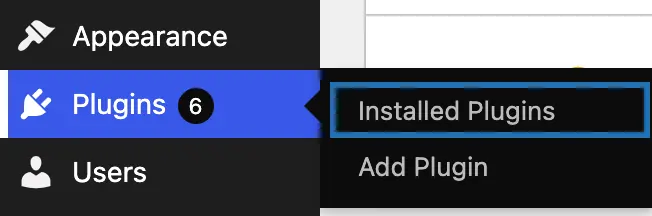
1. In your dashboard, go to Plugins › Installed Plugins.
2. To see only the plugins that are switched off, click Inactive above the list.

3. To switch a plugin off, click Deactivate under its name. It stops at once. Its settings usually stay, so Activate brings it back.

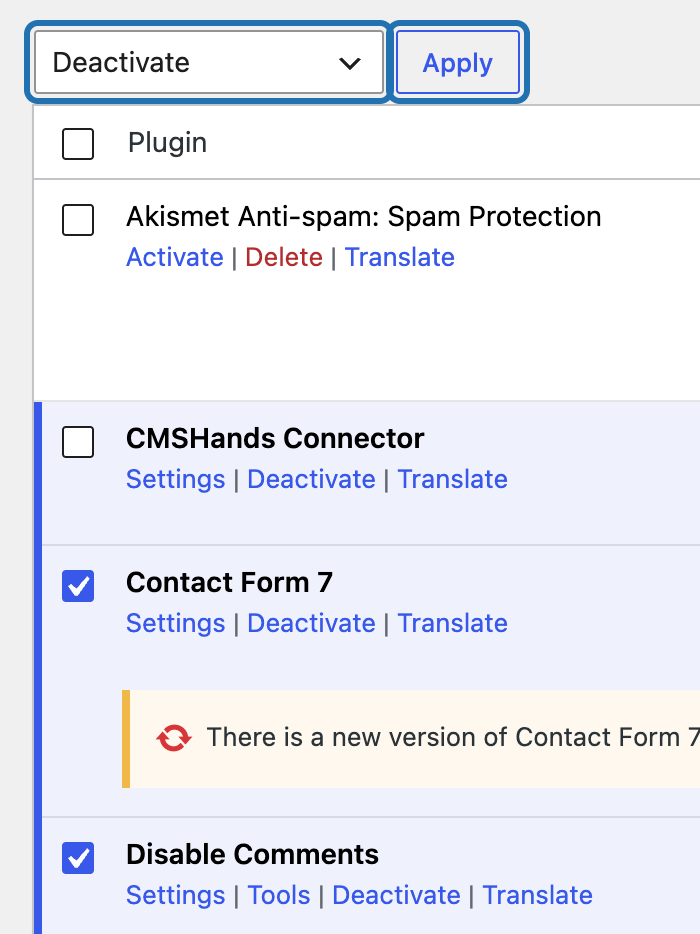
4. To switch off several at once, tick their boxes, choose Deactivate in the Bulk actions box, then press Apply.
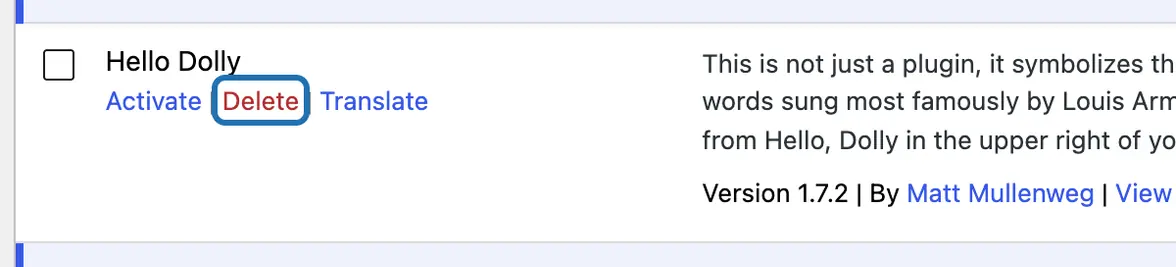
5. To delete a plugin, switch it off first. Then click the red Delete link under its name.
6. Your browser asks “Are you sure you want to delete …?” with the plugin's name. Press OK. The list then says it was deleted.



Locked out of your dashboard by a plugin? Open your host's file manager or connect by SFTP, the file access your host gives you. In wp-content/plugins, rename that plugin's folder, and WP switches it off. Rename it back later, then press Activate to switch it on again.
What it won't do here
It can't tell which plugins you really use
Deleting can't be undone
A switched-on plugin can't be deleted
One card per plugin
A site that won't load
Why it won't wreck your site
Asking changes nothing.
Nothing changes until you press the button.
One click undoes it.
Free to start
| No account | With your email | Paid plan | |
|---|---|---|---|
| Changes | 3 to try it | 10 every month | Coming. Nothing costs money until you choose it. |
| Questions | 30 a day | 100 a day | |
| If it breaks | Daily check and crash rescue | The same, plus email alerts |
Undo a change within 24 hours and it doesn't count. If you haven't added an email after 30 days, only crash rescue stays on until you add one. A change is one card you approve. A job that touches several pages or plugins is several changes.
Questions
How do I disable a plugin in WordPress?
Go to Plugins › Installed Plugins and click Deactivate under the plugin's name. It stops at once. Its settings usually stay, so Activate brings it back. With CMSHands, ask in the chat to switch the plugin off. You get a card first, and switching off undoes in one click.
What's the difference between deactivating and deleting a plugin?
Deactivating switches a plugin off but keeps its files and, usually, its settings. Deleting removes its files, and many plugins clear out their settings too. WP won't delete a plugin while it's switched on. If you're not sure you need a plugin, switch it off for a week first, then delete it.
How many plugins is too many?
There's no set number. A few heavy or badly kept plugins can cause more trouble than many small, well-kept ones. Keep the ones that do a job you need and still get updates. In our test run the site had 14 plugins. CMSHands named the 3 switched-off ones with a reason each, held back on 6 switched-on ones, and kept 3 clearly in use.
How do I disable all plugins at once?
In Plugins › Installed Plugins, tick the box at the top of the list to select every plugin. Choose Deactivate in Bulk actions and press Apply. Can't reach your dashboard? Rename the plugins folder inside wp-content with your host's file manager. That switches them all off. Rename it back, then switch each plugin on again.
Is it safe to delete plugins that are switched off?
Usually, yes: a switched-off plugin does nothing on your site. But deleting may also clear its settings, and you can't undo it. Keep one you'll switch back on later, like a spam filter. In our run, CMSHands said why each switched-off plugin was there before anything was removed.
Is it free?
To start, yes: 3 changes with no account, then 10 a month once you add your email. Each plugin you remove is one change. Questions like “which plugins don't I use?” are free, up to 30 a day.
Written by CMSHands team.
Try it on your own plugins
Needs WP 6.3 to 7.1, PHP 8.0 or newer, and an administrator login. One site per install.
The download is a plugin. Turning it on connects your site to cmshands.com and adds 3 small rescue files. Deleting the plugin removes them and everything it stored. What we send
Download the plugin.
It's free: 3 changes to try it. No account, no card.
Upload and activate it.
In your dashboard: Plugins › Add Plugin › Upload Plugin (Add New Plugin on older WP). Choose the file, press Install Now, then Activate Plugin.
Press Turn on.
Press Turn on CMSHands. No account, no key, no password.