Run your store by asking
Tell the chat in your WP dashboard what your shop needs: a new price, more stock, a coupon, a holiday sale bar. It does the clicking; each change waits on a card until you press OK.
For online stores on WP. Banners and colours need a block theme.
Needs WP 6.3 to 7.1 and PHP 8.0 or newer. What it installs
Needs WP 6.3 to 7.1, PHP 8.0 or newer, and an administrator login. One site per install.
The download is a plugin. Turning it on connects your site to cmshands.com and adds 3 small rescue files. Deleting the plugin removes them and everything it stored. What we send
Plugins are installed from a computer. Get the plugin here instead
- Nothing changes without your OK
- Undo in one click, or a warning first
- No account, no password to share
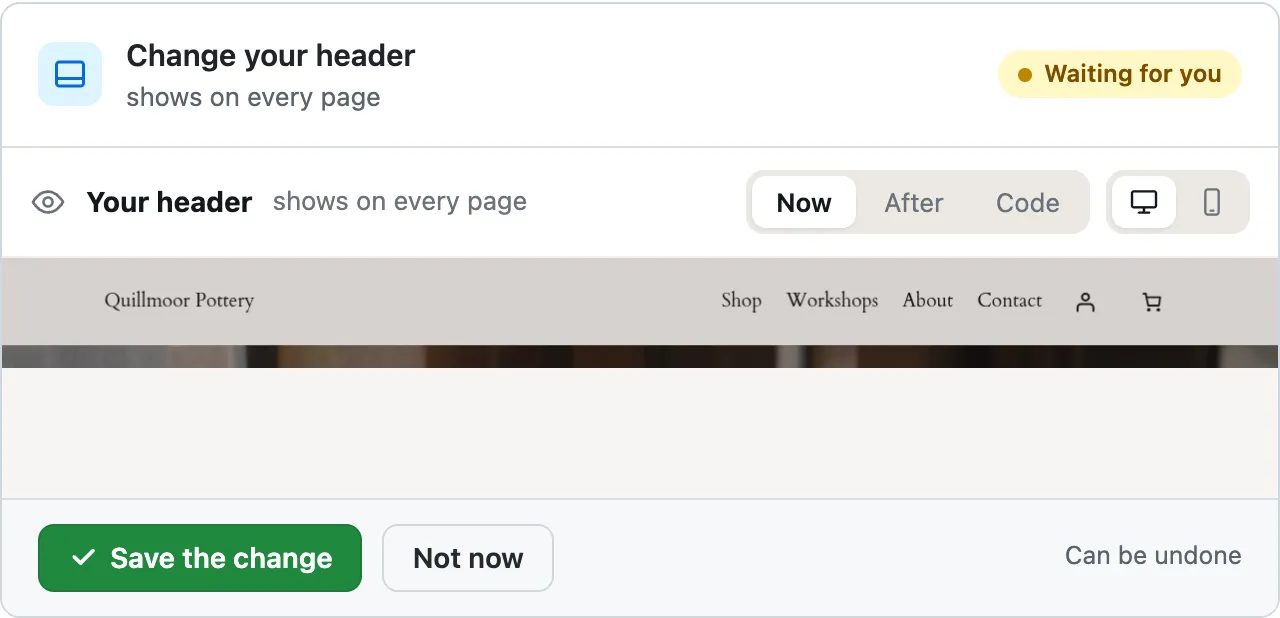
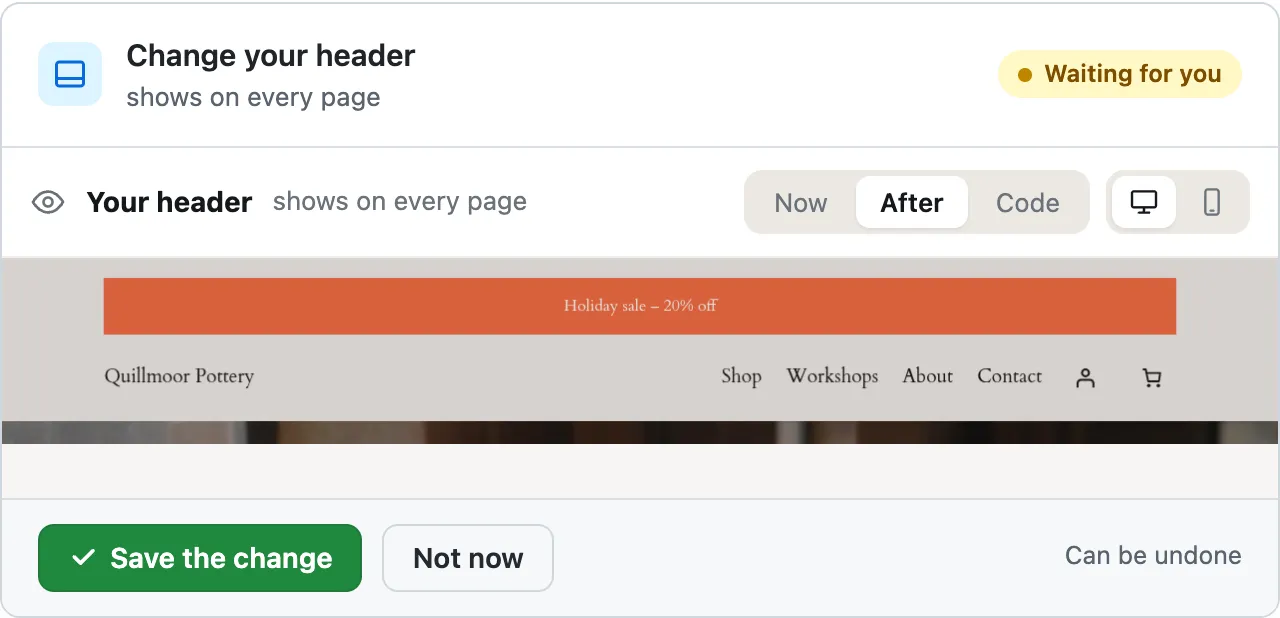
For the holidays: add a “Holiday sale – 20% off” bar at the very top of the header, deep red with white text, and make the buttons on my site the same red.

- <!-- wp:group {"align":"wide","style":{"spacing":{"padding":{"top":"20px","bottom":"20px"}}},"backgroundColor":"base","layout":{"type":"constrained"}} -->
- <div class="wp-block-group alignwide has-base-background-color has-background"
- style="padding-top:20px;padding-bottom:20px">
- <!-- wp:group {"align":"wide","backgroundColor":"accent-3","textColor":"base-2","style":{"spacing":{"padding":{"top":"var:preset|spacing|10","bottom":"var:preset|spacing|10"}}},"layout":{"type":"constrained"}} -->
- <div class="wp-block-group alignwide has-base-2-color has-accent-3-background-color has-text-color has-background" style="padding-top:var(--wp--preset--spacing--10);padding-bottom:var(--wp--preset--spacing--10)"><!-- wp:paragraph {"align":"center","fontSize":"small"} -->
- <p class="has-text-align-center has-small-font-size">Holiday sale – 20% off</p>
- <!-- /wp:paragraph --></div>
- <!-- /wp:group -->
- <!-- wp:group {"align":"wide","layout":{"type":"flex","justifyContent":"space-between","flexWrap":"wrap"}} -->
- <div class="wp-block-group alignwide">
- <!-- wp:group {"style":{"spacing":{"blockGap":"var:preset|spacing|20"},"layout":{"selfStretch":"fit","flexSize":null}},"layout":{"type":"flex"}} -->
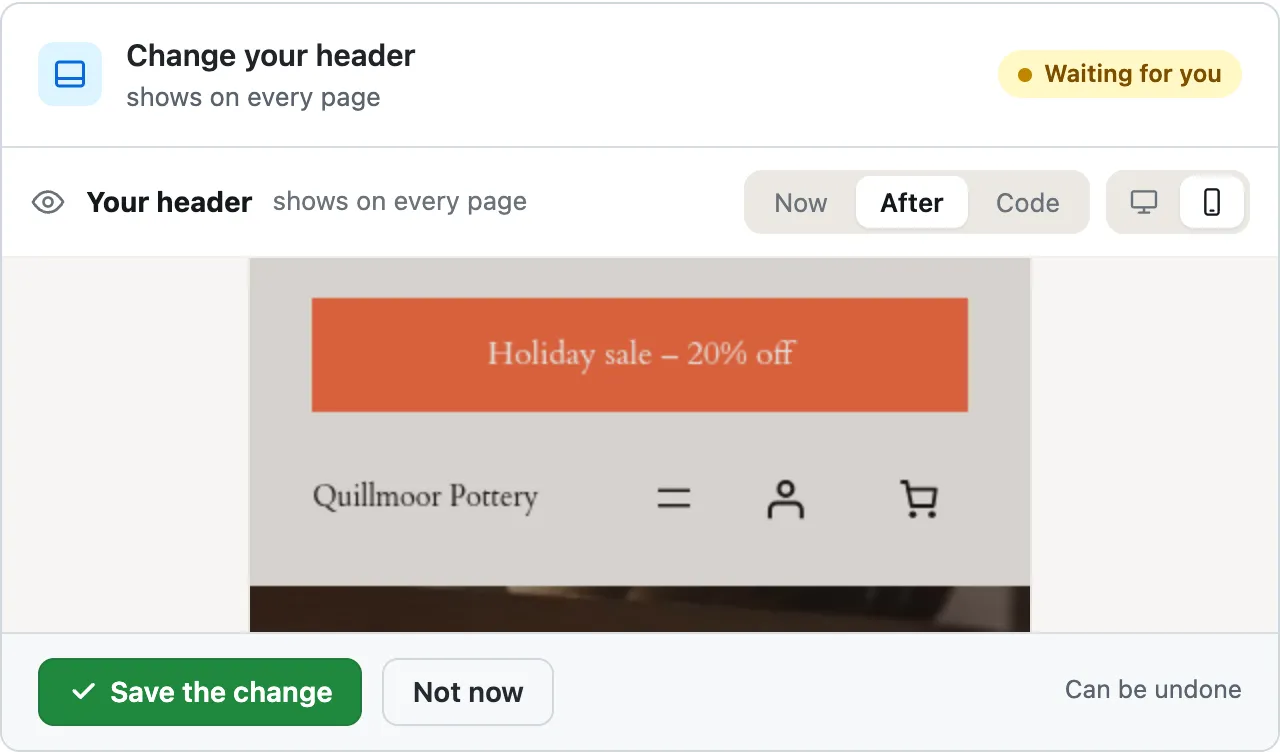
Both are ready for you to review — two cards.
One thing they can't show: the theme's palette has no deeper red, so "deep red" here is its rust red, the same colour used for the sale bar and the buttons. …
A real run on our test site, Oct 14, 2026. From asking to done, it took 1 minute 37 seconds.
- Nothing changes without your OK
- Undo in one click, or a warning first
- No account, no password to share
A year in your shop
- January
New prices for the new year
Change the price of the Speckled oat mug to $34.
It took 15 seconds on our test site.
- Spring
New products for spring
Add a new product to the shop: Spring blossom mug, $34, in the Mugs category. Description: Hand-thrown stoneware. Holds 350 ml.
It took 13 seconds on our test site.
Goes live in your shop at once. Can't be undone yet; the card says so first.
- Summer
A whole category on sale Coming soon
Say “everything in Mugs 20% off until Sunday”. You'll get one card for the whole category, and one undo.
- Autumn
A coupon for your newsletter
Make a coupon code AUTUMN for 10% off the whole order.
It took 13 seconds on our test site.
Can't be undone yet; the card says so before you press.
- November
A holiday sale bar across the top

This is the run at the top of the page.
Block themes only.
- December
A winter look for the whole site Coming soon
Ask for warmer colours and a softer heading font across the whole site; you see it on a computer and a phone before you press OK. Block themes.
Monday morning, one list
I just got 20 more Rust brown mugs in, so set its stock to 29. And the Small dipping bowl is sold out, mark it out of stock.
I just got 20 more Rust brown mugs in, so set its stock to 29. And the Small dipping bowl is sold out, mark it out of stock.
Two cards, one per product.
One thing the cards can't show: the site currently has the Small dipping bowl recorded as 25 in stock, so it was never counted down as they sold — worth a look if you're tracking stock numbers.
Lena Fischer's order #2185 has been delivered. Please mark it as completed.
Lena Fischer's order #2185 has been delivered. Please mark it as completed.
Ready for you to review — it's currently marked "processing", so this moves it to "completed".
Which of my products are out of stock? List them with their prices.
Which of my products are out of stock? List them with their prices.
Three of your twelve products are out of stock:
- Sage tall mug — 36
- Rust serving bowl — 68
- Dinner plate, oat — 42
All three are published and visible in the shop, with stock showing zero. The other nine have stock in hand (the lowest are Speckled bud vase with 3 and Nesting bowls, set of 3 with 4).
What sold this week? Show me the orders and the total.
What sold this week? Show me the orders and the total.
Five orders so far this week (your week starts Monday, so 12–14 October, today being Wednesday). These are all the orders on the site — nothing older to leave out:
| Order | Date | Customer | Status | Total |
|---|---|---|---|---|
| #2185 | Wed 14 Oct | Lena Fischer | processing | $34.00 |
| #2184 | Tue 13 Oct | Tom Becker | processing | $88.00 |
| #2183 | Tue 13 Oct | Priya Raman | completed | $120.00 |
| #2182 | Mon 12 Oct | Marcus Osei | completed | $95.00 |
| #2180 | Mon 12 Oct | Ada Lindqvist | completed | $102.00 |
Total: $439.00.
Two are still "processing" (payment on delivery, not yet marked complete): #2185 and #2184.
Everything waits for your OK
- Nothing changes until you press the button. Every change comes as a card that names it. Nothing happens until you press the button or Not now.
- You see it first. Old words in red, new words in green.
- One click undoes it. When something can't be undone, like deleting a page or a plugin, the card says so before you press.
- 32
- 34
Undone. I checked afterwards, and it's back the way it was.
What undo does in your shop today
| Store job | What undo does today |
|---|---|
| Prices and sale prices | Puts it back the way it was |
| Stock | Puts it back the way it was |
| Order status | Puts the status back. It can't unsend the email your shop already sent the customer |
| New coupons | Can't be undone yet; the card says so before you press |
| New products | Can't be undone yet; the card says so before you press |
| Holiday bar and button colours | Puts it back the way it was |
Free to start
- No account
- 3 to try it
- With your email
- 10 every month
- Paid plan
- Coming. Nothing costs money until you choose it.
A change is one card you approve. A job that touches several pages or plugins is several changes.
Coming next, and what it won't do
Coming soon
We're building these now. Each one gets a real run here once it works.
Drop a photo into the chat Coming soon
Drop a product photo into the chat and it goes on that product, after you press OK.
A whole category on sale Coming soon
Say “everything in Mugs 20% off until Sunday” and get one card for the whole category, and one undo.
A seasonal look for the site Coming soon
Warmer colours and a softer heading font across the whole site, shown before you press OK.
Switch theme for the season Coming soon
Switch to a holiday theme for December, and back again in January.
Approve now, done on Friday Coming soon
Press OK today and the change happens when you say, like Friday at 8.
Not for this chat
- Refunds, payment methods, shipping and taxes: do these in your store's own screens.
- Customer accounts and passwords.
- Banners and colours on older (classic) themes.
- Importing products from a file is on the paid plan, which isn't open yet.
- Each product it changes is its own card, and counts as one change on the free plan.
Questions
Does it work with WooCommerce?
Yes: on WP 6.3–7.1 with WooCommerce active it changes prices, stock, coupons and order status, and adds new products, each on its own card, and nothing happens until you press OK. Banners and colours need a block theme. WooCommerce is a trademark of Automattic Inc.
Can I undo a change in my shop?
Most of them: prices, stock, order status and banners undo in one click. New coupons and new products can't be undone yet, and the card says so before you press. To remove one by hand, open Products or Marketing › Coupons and move it to the trash.
Can I drop product photos into the chat?
Not yet; it's coming soon. Until then, add a photo in Products › edit the product › Product image, then press Update. Once the photo is on the product, the chat can change its price, stock and description for you.
Will it change my shop without asking?
No. Every change waits on a card that names it, until you press the button. Questions, like what sold this week, only read your shop: no card, no button. If you edited the same product in the meantime, it stops and tells you.
How many changes are free?
3 changes to try it, with no account, and 10 every month once you add your email. Questions are free, 30 a day (100 with your email). Each product it changes counts as one change, and an undo within 24 hours doesn't count.
Can it do refunds or payments?
No. Refunds, payment methods, shipping and taxes stay in your store's own screens: a refund from the order itself, the rest under WooCommerce › Settings. Every other change it makes still waits for your OK.
Try it on your own shop
- Nothing changes without your OK
- Undo in one click, or a warning first
- No account, no password to share