AI Engine alternative with no API key
A free plugin adds a chat to your WP dashboard, no API key needed. Ask it to write posts, style pages or install plugins. Undo puts it back.
Styling needs a block theme: your dashboard has Appearance › Editor.
Needs WP 6.3 to 7.1 and PHP 8.0 or newer. What it installs
Needs WP 6.3 to 7.1, PHP 8.0 or newer, and an administrator login. One site per install.
The download is a plugin. Turning it on connects your site to cmshands.com and adds 3 small rescue files. Deleting the plugin removes them and everything it stored. What we send
Plugins are installed from a computer. Get the plugin here instead
- Nothing changes without your OK
- Undo in one click, or a warning first
- No account, no password to share
AI Engine is a trademark of its owner. CMSHands is not affiliated with it.
Give the search box on my Shop page rounded corners, in the site's brown.

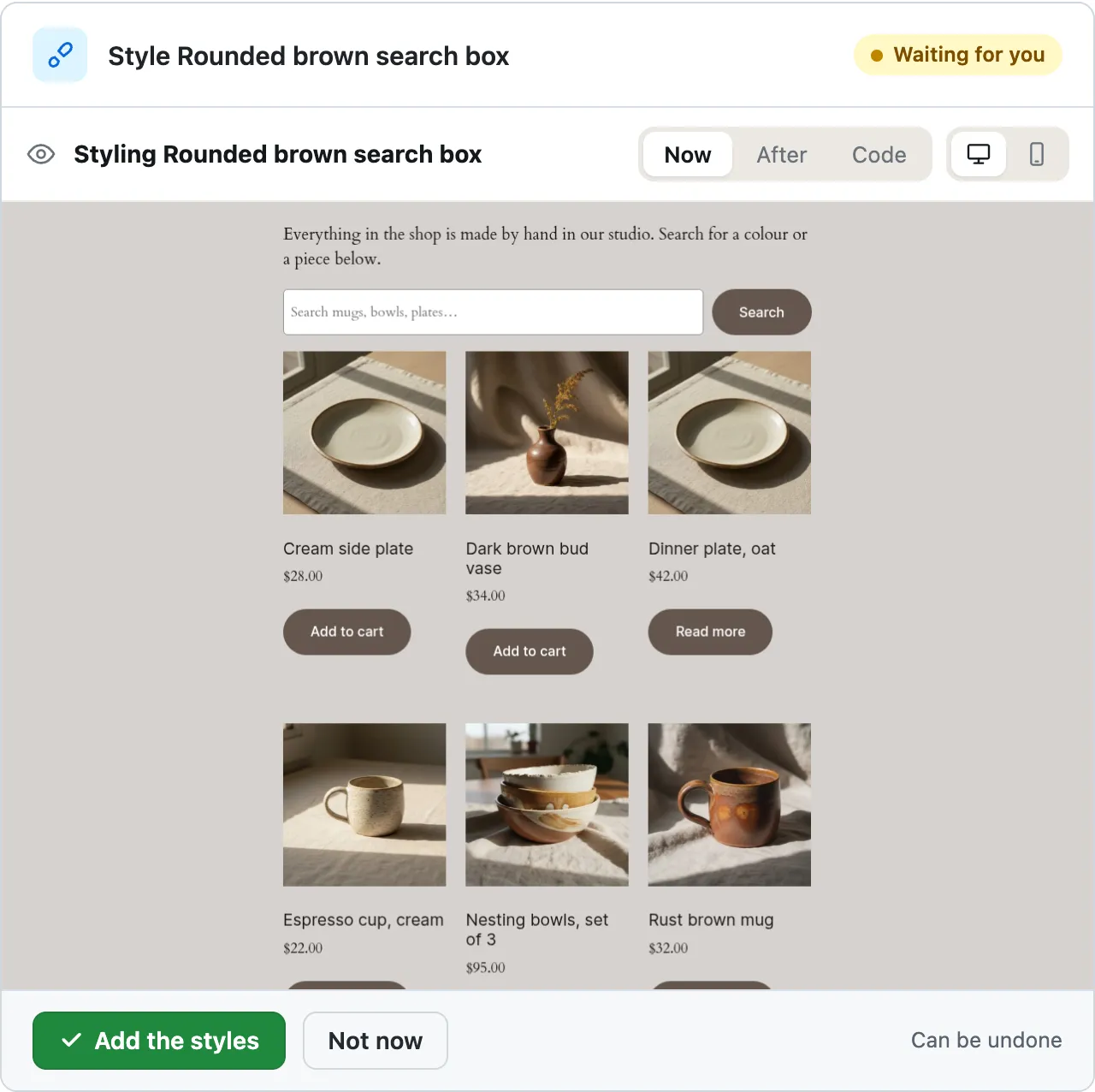
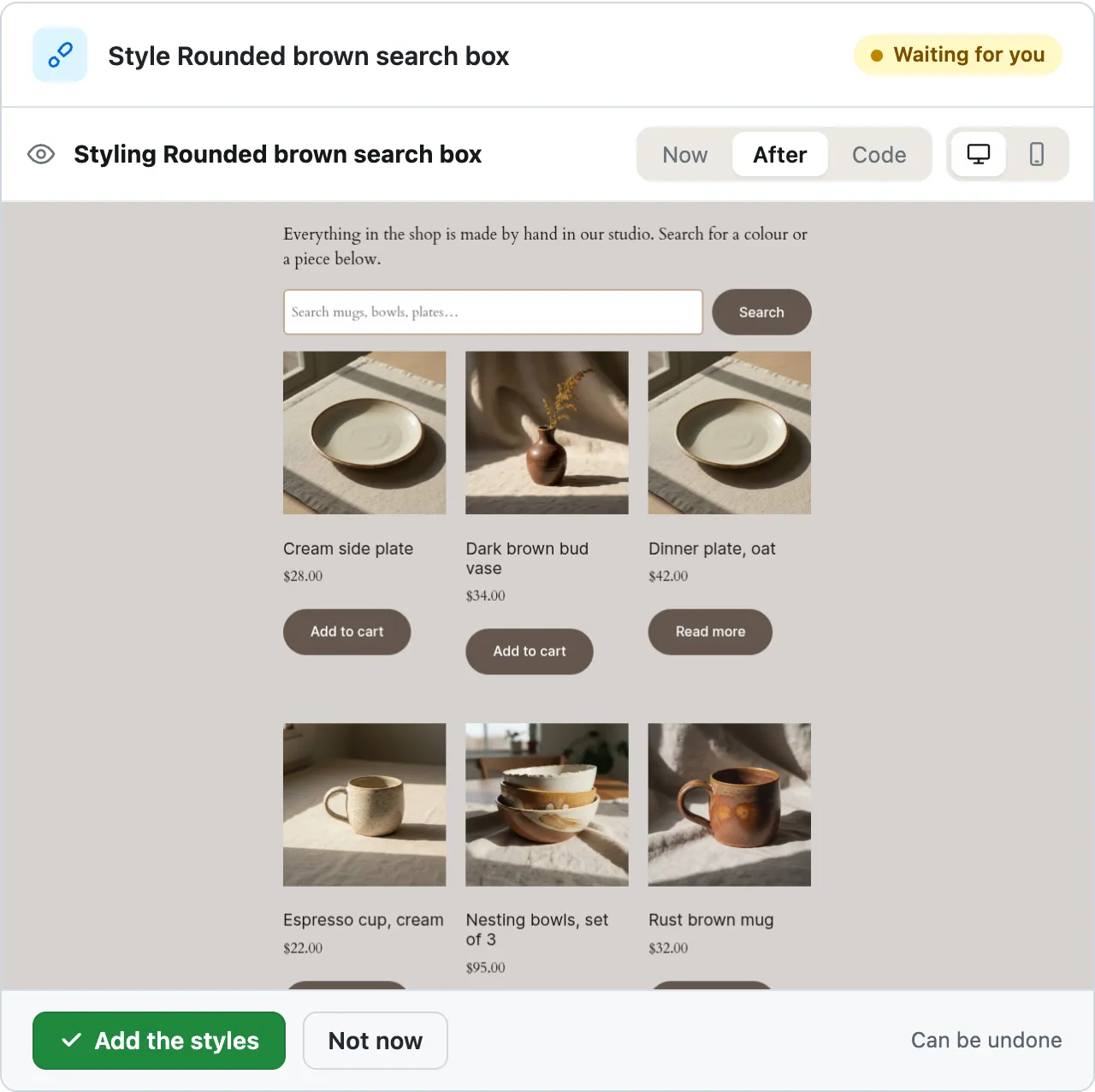
- /* CMSHands: Rounded brown search box */
- .wp-block-search .wp-block-search__input {
- border: 2px solid var(--wp--preset--color--accent-2);
- border-radius: 6px;
- }
Styling Rounded brown search box
I'll look at your Shop page and the theme's design first.
The button came out as a squared-off box, out of step with the pill-shaped buttons elsewhere on the page. Fixing that. …
A real run on our test site, Oct 11, 2026. From asking to done, it took 1 minute 4 seconds. Go through it step by step
How they compare
| CMSHands | AI Engine | |
|---|---|---|
| Built for | Doing jobs on the one site you run, from a chat in your WP dashboard, the screens you log in to at yoursite.com/wp-admin | Connecting WordPress with AI models: chatbots, content, forms and tasks1 |
| To start | Install the plugin and type. No API key and no AI account | Get an API key from OpenAI or another AI provider, and add it in its settings1 |
| Price | Free to start: 3 changes, then 10 a month with your email. Questions free, 30 a day. A paid plan is coming | The plugin is free. You pay your AI provider for what you use. A Pro version adds forms, knowledge bases and more1, 2 |
| Writing a post | Ask in the chat. It writes the post and asks before it goes on your site. Undo takes it down | Content Studio turns a brief into a full draft. A tool in the post editor rewrites and translates text1 |
| Plugins and styles | Finds and installs plugins from the WP plugin directory. Writes CSS, the rules that set how your site looks, on block themes | Pro's extra MCP tools add plugin and theme management, for an AI app you connect1 |
| Before a change | A card, a box in the chat that shows exactly what would change. Nothing changes until you press, and Undo puts it back | Workspace, its full-screen chat in wp-admin, asks for approval before any change1 |
| A chatbot for visitors | No. The chat is for you, in your dashboard | Yes: five themes, voice, file uploads and conversation memory1 |
| Images | No. It can't upload or make images | Image Studio makes images from a prompt and edits them1 |
| Outside AI apps (MCP) | No. CMSHands has no MCP server | A free MCP server, a way for AI apps to use tools on your site, with more than 50 tools1 |
| Many sites | No: one site per install | Yes: connect several WP sites and manage them through conversation1 |
Built for
- CMSHands
- Doing jobs on the one site you run, from a chat in your WP dashboard, the screens you log in to at yoursite.com/wp-admin
- AI Engine
- Connecting WordPress with AI models: chatbots, content, forms and tasks1
To start
- CMSHands
- Install the plugin and type. No API key and no AI account
- AI Engine
- Get an API key from OpenAI or another AI provider, and add it in its settings1
Price
- CMSHands
- Free to start: 3 changes, then 10 a month with your email. Questions free, 30 a day. A paid plan is coming
Writing a post
- CMSHands
- Ask in the chat. It writes the post and asks before it goes on your site. Undo takes it down
- AI Engine
- Content Studio turns a brief into a full draft. A tool in the post editor rewrites and translates text1
Plugins and styles
- CMSHands
- Finds and installs plugins from the WP plugin directory. Writes CSS, the rules that set how your site looks, on block themes
- AI Engine
- Pro's extra MCP tools add plugin and theme management, for an AI app you connect1
Before a change
- CMSHands
- A card, a box in the chat that shows exactly what would change. Nothing changes until you press, and Undo puts it back
- AI Engine
- Workspace, its full-screen chat in wp-admin, asks for approval before any change1
A chatbot for visitors
- CMSHands
- No. The chat is for you, in your dashboard
- AI Engine
- Yes: five themes, voice, file uploads and conversation memory1
Images
- CMSHands
- No. It can't upload or make images
- AI Engine
- Image Studio makes images from a prompt and edits them1
Outside AI apps (MCP)
- CMSHands
- No. CMSHands has no MCP server
- AI Engine
- A free MCP server, a way for AI apps to use tools on your site, with more than 50 tools1
Many sites
- CMSHands
- No: one site per install
- AI Engine
- Yes: connect several WP sites and manage them through conversation1
CMSHands and AI Engine, side by side. AI Engine facts read Oct 14, 2026.
- 1. wordpress.org/plugins/ai-engine, Oct 14, 2026
- 2. meowapps.com/ai-engine, Oct 14, 2026
Watch it do this on a real site
You ask
One sentence in the chat. You don't need to write CSS, the rules that set how your site looks, or know what your theme calls its colors.
You ask
One sentence in the chat. You don't need to write CSS, the rules that set how your site looks, or know what your theme calls its colors.
Give the search box on my Shop page rounded corners, in the site's brown.
You see it first
It read your theme's colors and the Shop page, wrote the CSS and tried it in a preview. Its first try made the Search button squarer than the shop's other buttons, so it fixed that and tried again. About 47 seconds after the request, the card showed the Shop page with the new CSS, here on a phone.
Give the search box on my Shop page rounded corners, in the site's brown.
- Looking for what you meant2.0 s
- Looking at your theme’s colours and sizes2.3 s
- Reading one of your pages4.2 s
- Preparing the new styles for your OK14 s
- Previewing the change14 s
- Preparing the new styles for your OK30 s
- Previewing the change31 s
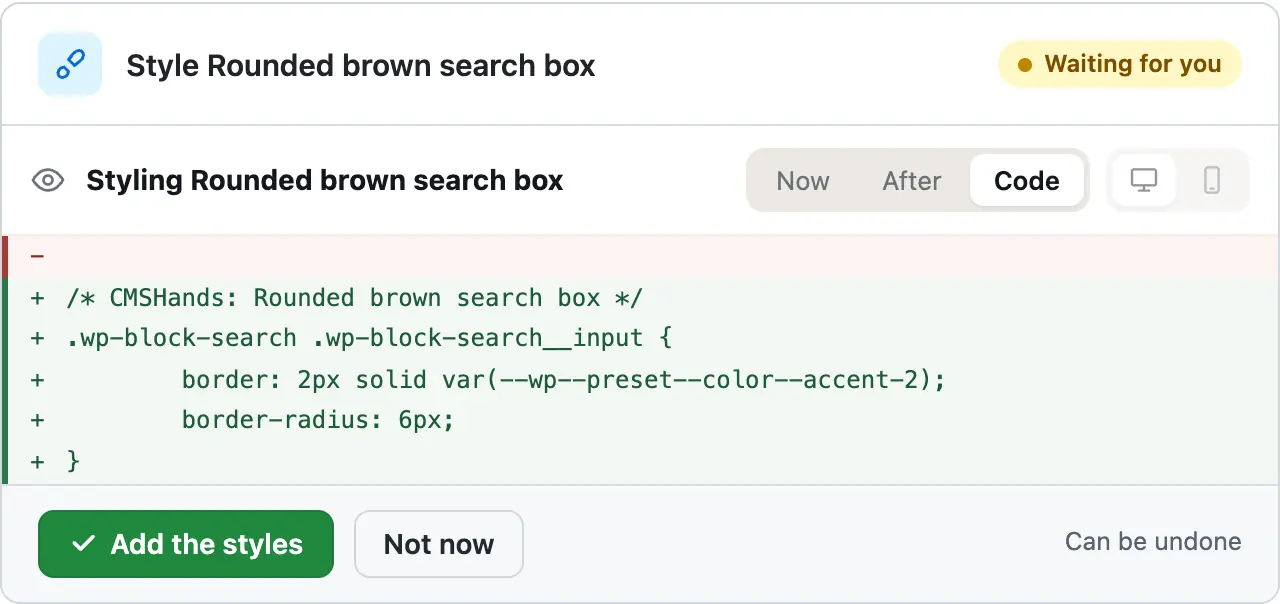
- /* CMSHands: Rounded brown search box */
- .wp-block-search .wp-block-search__input {
- border: 2px solid var(--wp--preset--color--accent-2);
- border-radius: 6px;
- }
Styling Rounded brown search box
I'll look at your Shop page and the theme's design first.
The button came out as a squared-off box, out of step with the pill-shaped buttons elsewhere on the page. Fixing that. …
See the CSS it adds
Code shows the exact CSS it would add, for the search field only. The color is your theme's own light brown, which it calls accent-2, not the darker brown of the buttons. If you meant that one, say so before you press.
You press the button
Nothing on the site changed until this press. Then it added the CSS to your site's Additional CSS, read it back and turned the card green. Its check quotes the CSS it found there.
- Adding styles to your site63 s
- Checking the change63 s
Done. I checked afterwards, and it now says "/* CMSHands: Rounded brown search box */ .wp-block-search .wp-block-search__input { border: 2px solid var(--wp--preset--color--accent-2); border-radius: 6px; }".
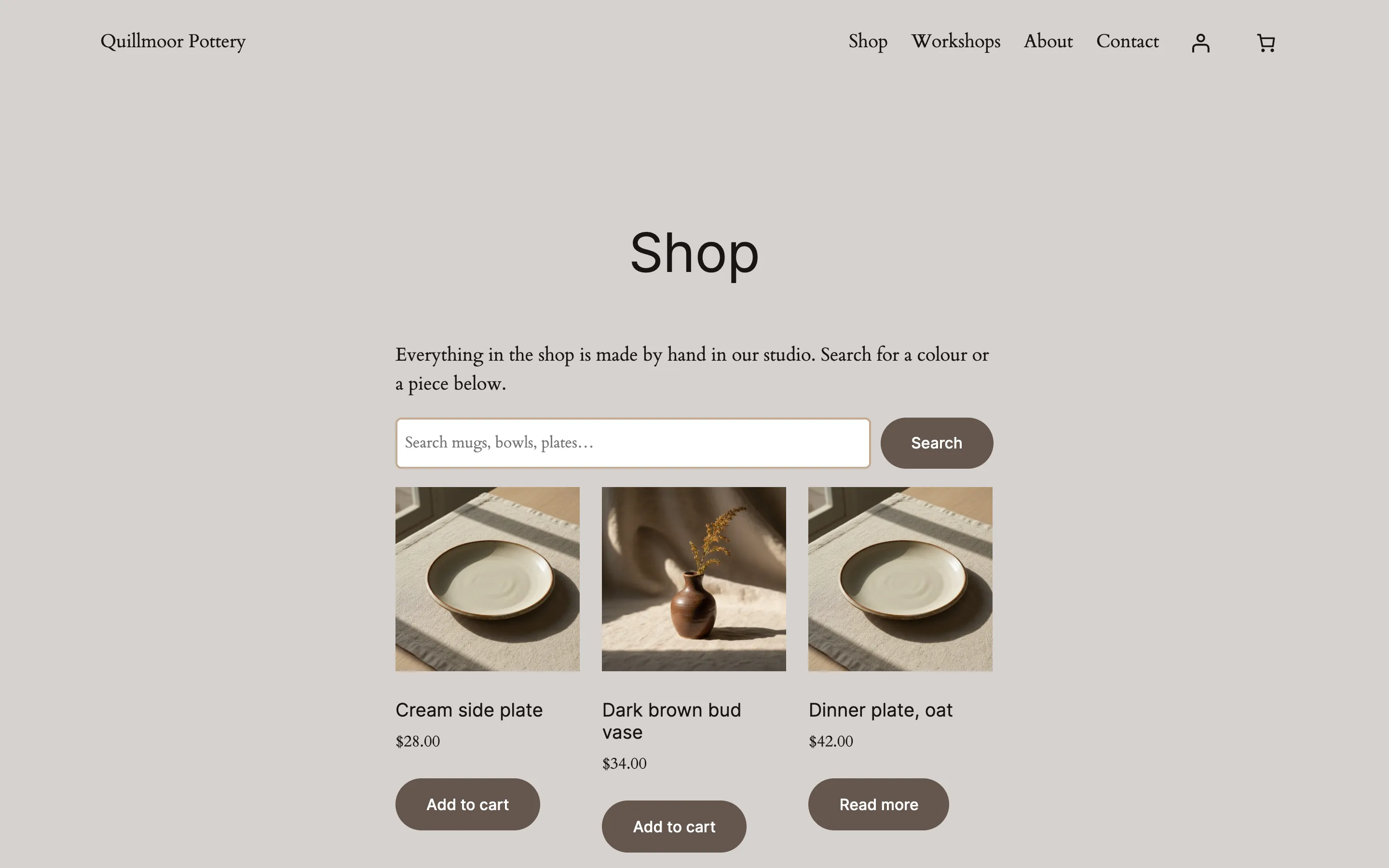
It's on the site
The Shop page right after, as a visitor sees it. Nothing else on the page changed. The CSS sits in your site's Additional CSS, so a search box on another page would get the same look.
Undo, if you want
Pressing Undo took the CSS out again. It read your site's styles back to make sure, and the Shop page looked as it did before. This picture is the chat opened again afterwards: the card's foot says the site is back too.
- Reverting the change74 s
- Checking the change75 s
Undone. I checked afterwards, and it's back the way it was.
Quillmoor Pottery, WP 7.1.3, Twenty Twenty-Four. Step times count from the moment the request was sent.
- It wrote the CSS for our Shop search box in the theme's brown and showed the page first, on desktop or phone.
- Paste your notes and it writes a post. Nothing goes on your site until you press the button on its card.
- Ask for a booking calendar and it picks one from the WP plugin directory, then installs it when you say yes.
More it does here (5)
- Undo on the card takes the post down, takes the CSS out, or switches the plugin off and deletes it.
- It changes words on your pages, and the header and footer on block themes.
- On block themes it adds a button or moves a block, with before-and-after pictures for desktop and phone.
- It updates plugins from the WP plugin directory, checks your site after, and puts the old version back if it got worse.
- Ask “Give me a health report” and it answers without changing anything.
Which one fits
Who should keep AI Engine
Keep AI Engine if you want a chatbot for your visitors, AI forms, or images made from a prompt. It also lets you pick your AI provider, lets outside AI apps work on your site through its free MCP server, and can manage several sites from one conversation (wordpress.org/plugins/ai-engine, read Oct 14, 2026). CMSHands does none of these. It does jobs on your one site, from its own chat, with no key to set up.
Can you use both?
Yes, they're separate plugins. You could keep AI Engine's chatbot for your visitors and use the CMSHands chat for changes to your site. We haven't tested the two side by side on our test site yet, so make a change from one of them at a time, or you won't know which one changed what.
Why it won't wreck your site
- Nothing changes until you press the button. Every change comes as a card that names it. Nothing happens until you press the button or Not now.
- You see it first. Old words in red, new words in green. For layout, before-and-after pictures on a computer and a phone.
- One click undoes it. When something can't be undone, like deleting a page or a plugin, the card says so before you press.
What it won't do here
- Styling needs a block themeOn an older theme, one with Appearance › Customize instead of Editor, it writes the CSS and tells you where to paste it.
- A new post goes live when you pressThe card names the post but doesn't show its words. Read it on your site after, and press Undo if it's wrong.
- Undo removes a plugin, not what it madeUndo switches the plugin off and deletes it. In our test, Events Manager's 5 pages and its settings stayed. Delete those pages yourself in Pages.
- Plugins from the WP plugin directory onlyIt finds and installs the free plugins at wordpress.org. A plugin you bought installs through its maker.
- No imagesIt can't upload images or make them. Add pictures to your Media Library yourself.
Free to start
- No account
- 3 to try it
- With your email
- 10 every month
- Paid plan
- Coming. Nothing costs money until you choose it.
A change is one card you approve. A job that touches several pages or plugins is several changes.What's free
Questions
Is CMSHands made by AI Engine?
No. CMSHands is a separate plugin from a separate company, and it isn't affiliated with AI Engine or Meow Apps. If you use AI Engine and want its settings, they're under Meow Apps › AI Engine in your WP dashboard. For help with it, go to meowapps.com.
Is AI Engine free?
Yes. The plugin is free on wordpress.org, and so is its MCP server. You need your own API key from an AI provider such as OpenAI, and you pay that provider for what you use. We read this on wordpress.org/plugins/ai-engine on Oct 14, 2026.
What does AI Engine Pro add?
AI forms, knowledge bases built from your content and PDFs, function calling, an editor sidebar that rewrites and moves blocks, usage limits per role, and extra MCP tools for plugins, themes and the database. That's the Pro list on wordpress.org/plugins/ai-engine, read Oct 14, 2026. For the price, see meowapps.com.
Can the AI Engine WordPress plugin make changes to my site?
Yes, through MCP, a way for AI apps to use tools on your site. An AI app you connect can write and edit posts, manage media and moderate comments. Its Workspace chat asks for approval before any change. Plugin, theme and database tools come with Pro (wordpress.org/plugins/ai-engine, read Oct 14, 2026).
Do I need an API key to use CMSHands?
No. Install the plugin, open the chat in your WP dashboard and type. There's no AI account to make and no key to paste. You get 3 changes with no account, then 10 a month once you add your email. Questions are free, up to 30 a day.
Written by CMSHands team.
Try it on your own site
- Nothing changes without your OK
- Undo in one click, or a warning first
- No account, no password to share