
Find the right WP plugin for the job
A free plugin adds a chat to your WP dashboard. Ask “Which popup plugin should I use?” It names one that fits your site. Installing waits for your OK.
Picks from the WP plugin directory and checks it fits your WP and PHP.
- Nothing changes without your OK
- Undo in one click, or a warning first
- No account, no password to share
Needs WP 6.3 to 7.1, PHP 8.0 or newer, and an administrator login. One site per install.
The download is a plugin. Turning it on connects your site to cmshands.com and adds 3 small rescue files. Deleting the plugin removes them and everything it stored. What we send
Which popup plugin should I use for a newsletter sign-up?

Watch it do this on a real site

You ask
You ask the chat in your WP dashboard which popup plugin to use, and what it's for. You don't need to know any plugin names.
Which popup plugin should I use for a newsletter sign-up?
It names one
It searched the WP plugin directory, the free plugins at wordpress.org, and named one plugin about 4 seconds after the question. It said how many sites use it, how it's rated, when it was last updated, and that it fits the site's WP and PHP. We checked those numbers on wordpress.org the same day. It installed nothing. The card it offers is a box in the chat that shows exactly what would change, and nothing installs until you press its button.
Poptin — Email Marketing Automation, Newsletter & Exit Pop Ups. It's built for exactly this: email popups and newsletter sign-ups. 20,000 sites use it, 98% of its 699 reviews are positive, and it was last updated 12 days ago. It has no problems against your WordPress 7.1.3 and PHP 8.4.26. I can install and switch it on if you want — say the word and I'll put the card up.
- 1 secondSearching the WordPress plugin directory
A real run on our test site, Oct 11, 2026. Questions change nothing, so there's no button: this is the answer it gave.
That's the whole job. The plugin is free: 30 questions a day, no account. Asking changes nothing on your site.
Needs WP 6.3 to 7.1, PHP 8.0 or newer, and an administrator login. One site per install.
The download is a plugin. Turning it on connects your site to cmshands.com and adds 3 small rescue files. Deleting the plugin removes them and everything it stored. What we send
How to find a WordPress plugin yourself
Checked on WP 7.1, Oct 11, 2026
1. Start in Plugins › Installed Plugins. If a plugin you already have does the job, set that one up instead of adding a second.
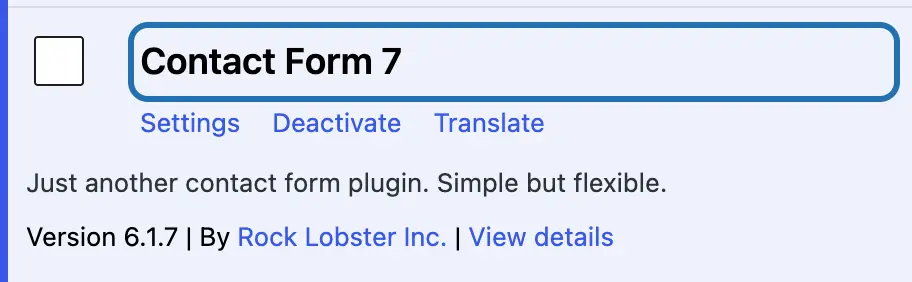
2. Go to Plugins › Add Plugin. In Search Plugins, type the job, like “popup” or “contact form”, rather than a plugin's name.

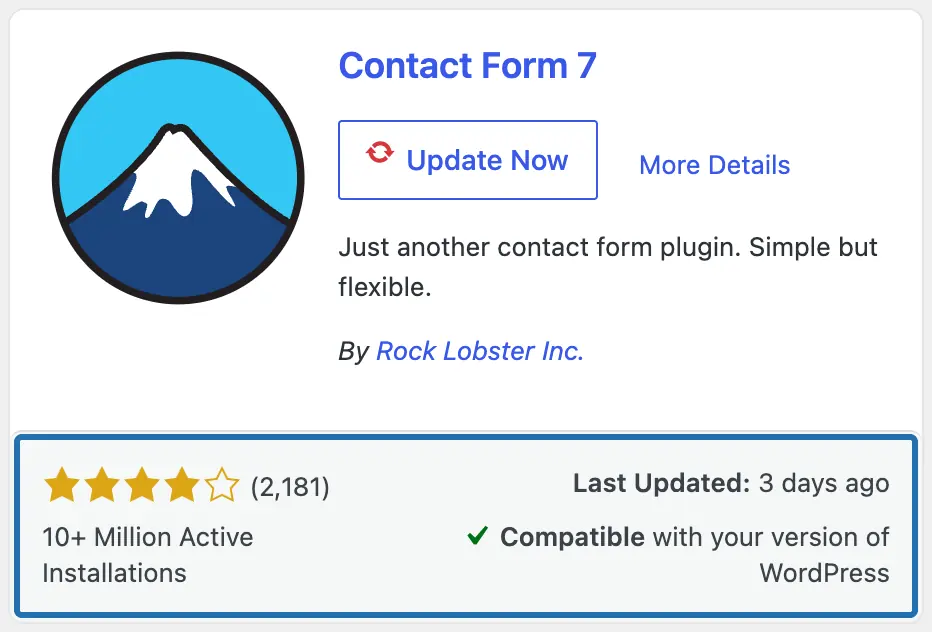
3. Read each card's bottom row: Last Updated, Active Installations, and the number beside the stars, which is how many people rated it.
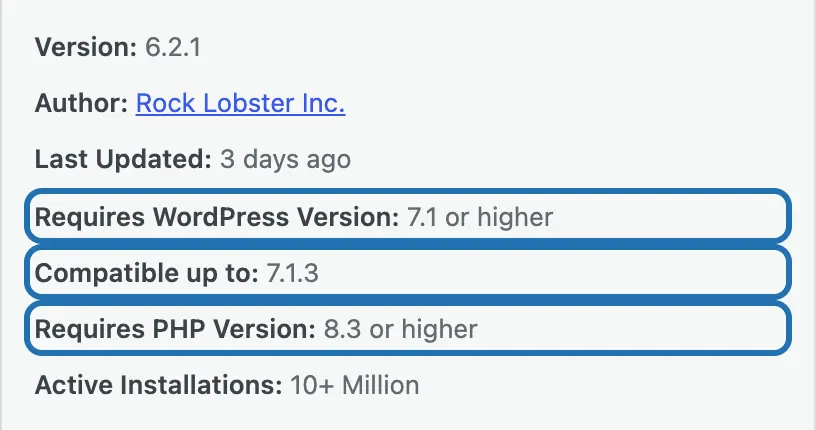
4. Open More Details. Compare Requires WordPress Version and Requires PHP Version with Tools › Site Health › Info. PHP is the language WP runs on.
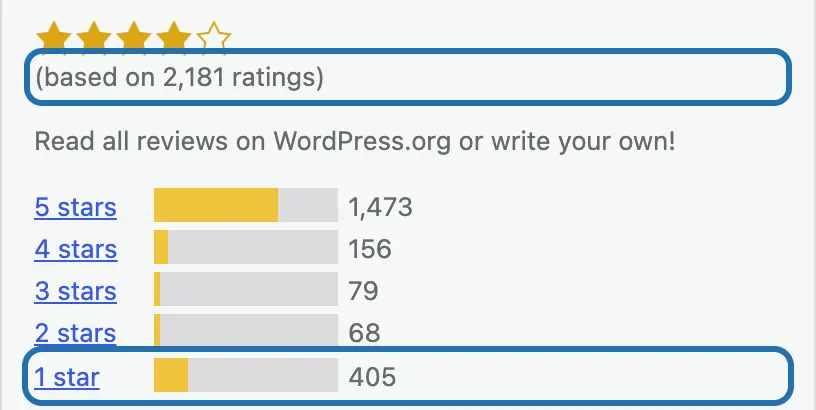
5. Below the stars, check the bars. Click 1 star to read the worst reviews on wordpress.org and see what went wrong for people.
6. Picked one? Install a plugin by asking shows how to install it, by hand or in the chat.


Five stars from six people says little. Four stars from thousands says more. Compatible up to is the newest WP its makers tried it with, and your host sets your PHP version. Some free plugins work only with an account at an outside service, such as an email list. The Description tab usually says so.
What it won't do here
Premium plugins: it can't find or install them
It suggests one plugin, not a list to compare
It reads the listing, not the reviews, and doesn't try the plugin
Undo removes the plugin, but maybe not what it saved
It may not tell you a plugin needs an account
Why it won't wreck your site
Asking changes nothing.
Nothing changes until you press the button.
One click undoes it.
Free to start
| No account | With your email | Paid plan | |
|---|---|---|---|
| Changes | 3 to try it | 10 every month | Coming. Nothing costs money until you choose it. |
| Questions | 30 a day | 100 a day | |
| If it breaks | Daily check and crash rescue | The same, plus email alerts |
Undo a change within 24 hours and it doesn't count. If you haven't added an email after 30 days, only crash rescue stays on until you add one. A change is one card you approve. A job that touches several pages or plugins is several changes.
Questions
How do I find a good plugin for my WordPress site?
Look in Plugins › Installed Plugins first: you may have one already. Then search the job in Plugins › Add Plugin and judge by more than the stars: how many people rated it, what the 1-star reviews say, and the WP and PHP versions it needs. The steps above show where to find each one.
Which popup plugin should I use?
It depends on the job: a newsletter sign-up, a sale, a notice. Search that job in Plugins › Add Plugin and check the results as in the steps above. Some popup plugins work through an account on their maker's site, so read the Description tab first. In the run above, CMSHands named Poptin and installed nothing. Poptin's wordpress.org page says you make a free Poptin account to use it. The chat didn't mention that.
Is there a free calendar or booking plugin for WordPress?
Yes, the WP plugin directory has free calendar, event and booking plugins. Search “event calendar” or “booking” in Plugins › Add Plugin. Decide what you need first: showing events, taking bookings and taking payments are different jobs, and payments often cost extra. Then check the results as in the steps above.
What if I already have a plugin for that job?
Then you likely don't need another. On our test site, a WP site we run to try every task, we asked “Which contact form plugin should I use? Install the one you'd pick.” It listed the site's plugins, saw Contact Form 7 was already on, and installed nothing. It pointed to the update waiting for it instead. Two plugins for one job, like two contact forms, don't know about each other and leave you two things to set up.
Is there a good free forum plugin for WordPress?
Yes. Search “forum” in Plugins › Add Plugin and you'll see free ones. A forum is a big job: people sign up, post and reply, and someone has to keep spam out. So pick one that's updated often and used on many sites, and read its 1-star reviews. Check what the free version includes too: some makers keep extras for a paid one.
Written by CMSHands team.
Find a plugin for your own site
Needs WP 6.3 to 7.1, PHP 8.0 or newer, and an administrator login. One site per install.
The download is a plugin. Turning it on connects your site to cmshands.com and adds 3 small rescue files. Deleting the plugin removes them and everything it stored. What we send
Download the plugin.
It's free: 3 changes to try it. No account, no card.
Upload and activate it.
In your dashboard: Plugins › Add Plugin › Upload Plugin (Add New Plugin on older WP). Choose the file, press Install Now, then Activate Plugin.
Press Turn on.
Press Turn on CMSHands. No account, no key, no password.