
Make your phone number and email clickable
A free plugin adds a chat to your WP dashboard. Type “Make our phone number and email in the footer clickable.” See the links first, press the button. One-click undo.
Works on block themes: you'll see Appearance › Editor in your dashboard. How to tell
- Nothing changes without your OK
- Undo in one click, or a warning first
- No account, no password to share
Needs WP 6.3 to 7.1, PHP 8.0 or newer, and an administrator login. One site per install.
The download is a plugin. Turning it on connects your site to cmshands.com and adds 3 small rescue files. Deleting the plugin removes them and everything it stored. What we send
Make our phone number and email in the footer clickable.

Watch it do this on a real site

You ask
You type what you want, the way you'd say it. The chat sits in your WP dashboard.
Make our phone number and email in the footer clickable.
You see it first
It read the footer and came back with a card 23 seconds after the request: the footer as it would look, with the number and email underlined as links. Nothing has changed yet.
Ready for you to review — the links keep the same size and place, and both wrap cleanly on a phone.
- 2 secondsLooking at your themes
- 3 secondsLooking at your theme’s colours and sizes
- 4 secondsReading your footer
- 7 secondsReading your footer
- 10 secondsPreparing the change for your OK
- Previewing your footer

The exact line it changes
Press Code to see the one line it changes. In red, the number and email as plain words. In green, the same words wrapped in a tel: link, which starts a call when tapped on a phone, and a mailto: link, which opens an email. The rest of the footer stays as it was.

You press the button
Only now does it change the site. It saves the footer, reads it back to check, and the card turns green with an Undo link. Its sentence quotes the words, which stay the same: what changed is that they're links now.
- 38 secondsChanging your footer
- Checking the change

It's on the site
The test site's home page right after, seen by a visitor. The number and email are underlined now, in the same spot and size. Before, they were plain words nobody could tap.
Done. I checked afterwards, and it now says "555-0142 hello@quillmoor.example".

Undo, if you want
One press of Undo put the plain words back. It checked the footer again and showed what it put back.
Undone. I checked afterwards, and it's back the way it was.
- 47 secondsReverting the change
- 48 secondsChecking the change
A real run on our test site, Quillmoor Pottery (WP 7.1.3, Twenty Twenty-Four), Oct 11, 2026. From asking to done, it took 38 seconds.
That's the whole job. The plugin is free: 3 changes to try it, no account. Nothing changes until you press the button.
Needs WP 6.3 to 7.1, PHP 8.0 or newer, and an administrator login. One site per install.
The download is a plugin. Turning it on connects your site to cmshands.com and adds 3 small rescue files. Deleting the plugin removes them and everything it stored. What we send
How to make a phone number clickable in WordPress yourself
Checked on WP 7.1, Oct 11, 2026
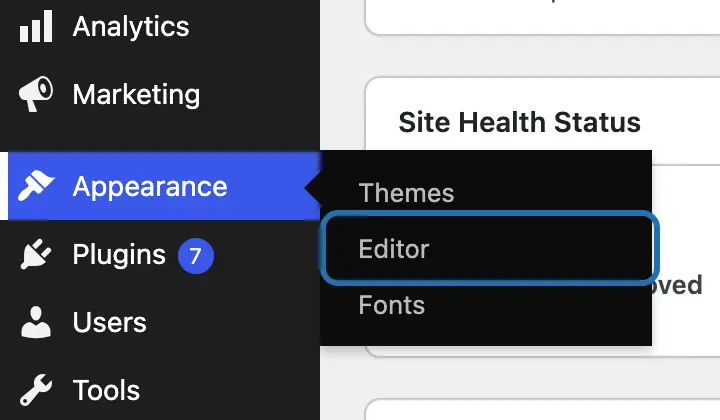
1. Open Appearance › Editor in your WP dashboard. No Editor there, only Appearance › Customize? Your theme is an older one: see below.
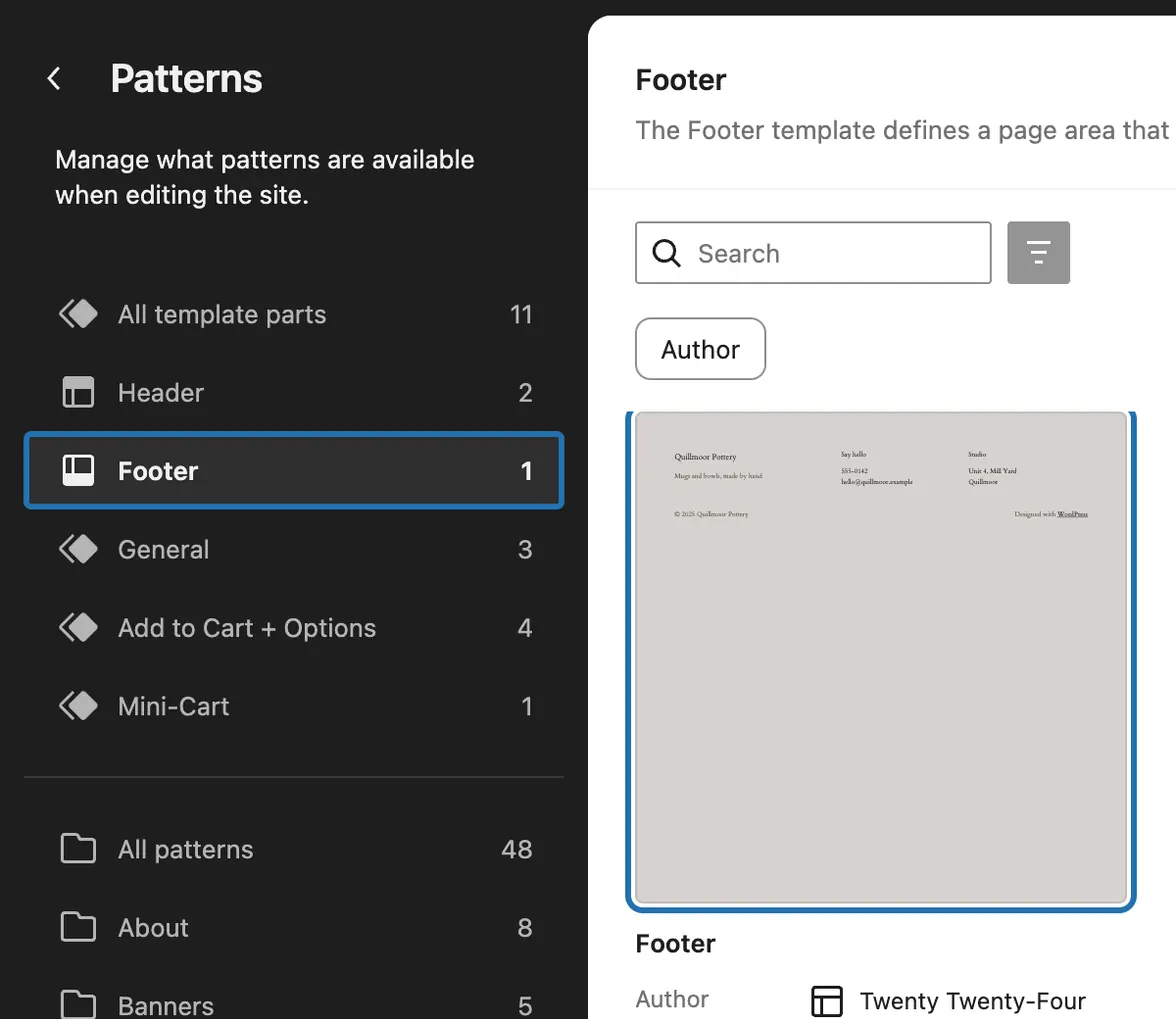
2. Choose Patterns, then Footer under template parts. Click the footer's picture to open it.
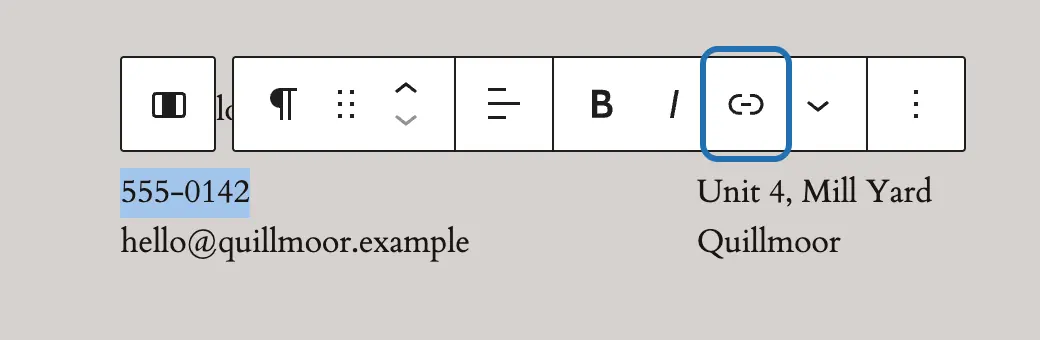
3. Select the phone number, the way you'd select words to copy them. In the toolbar above it, press Link, the chain icon.
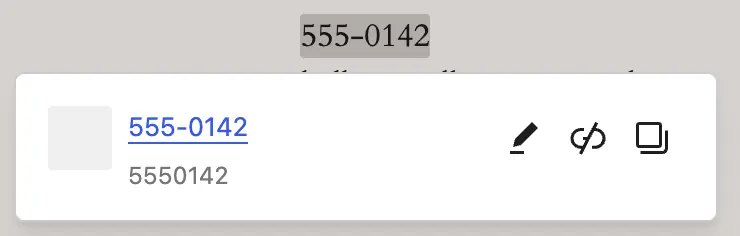
4. WP sees a phone number and links it at once. The box under it shows the digits a phone will dial.
5. Do the same with the email address: select it and press Link. WP turns it into an email link by itself.
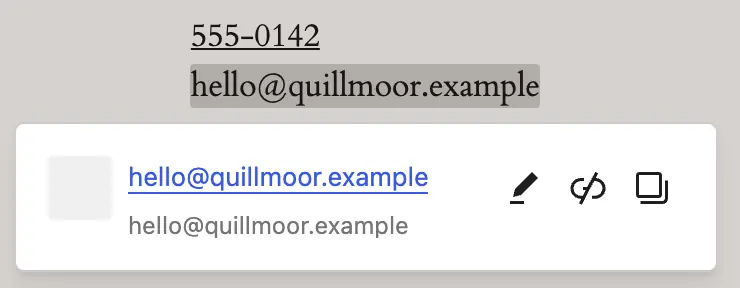
6. Press Save at the top right. Then open your site on a phone and tap the number: it should offer to call.



On an older (classic) theme, the kind with Appearance › Customize instead of Editor, the footer's phone number often sits in a widget (Appearance › Widgets) or in the theme's own settings. Where you find it depends on the theme. CMSHands can't change widgets or theme settings.
The footer is one piece every page shares, so one link covers the whole site. Ctrl+K (⌘K on a Mac) does the same as the Link button. WP writes the phone link with digits only, like tel:5550142. CMSHands kept the dashes, tel:555-0142. Both work: dashes are allowed in a phone link. The link dials the number as it's written, so write it with your area code.
What it won't do here
A floating call button
Older (classic) themes
Menus, widgets and page-builder pages
One card per place
Why it won't wreck your site
Nothing changes until you press the button.
You see it first.
One click undoes it.
Free to start
| No account | With your email | Paid plan | |
|---|---|---|---|
| Changes | 3 to try it | 10 every month | Coming. Nothing costs money until you choose it. |
| Questions | 30 a day | 100 a day | |
| If it breaks | Daily check and crash rescue | The same, plus email alerts |
Undo a change within 24 hours and it doesn't count. If you haven't added an email after 30 days, only crash rescue stays on until you add one. A change is one card you approve. A job that touches several pages or plugins is several changes.
Questions
How do I make a phone number clickable in WordPress?
Turn it into a phone link. In the block editor, select the number and press Link, or Ctrl+K (⌘K on a Mac). WP 7.1 sees it's a phone number and makes a tel: link by itself, the kind that starts a call when tapped. Then press Save. For the number in your footer, open the footer first: Appearance › Editor › Patterns › Footer.
How do I link an email address in WordPress?
The same way as a phone number: select the address and press Link. WP 7.1 sees it's an email address and makes a mailto: link, which opens the visitor's email app with your address filled in. To type one by hand, write mailto: and then the address, like mailto:hello@quillmoor.example.
What does a phone link look like?
It's tel: and then the number, with no spaces: tel:555-0142 or tel:5550142. Dashes are fine. Use the full number your callers dial, with the area code. For callers abroad, start it with + and your country code. The words people see can be the number itself or anything else, like “Call us”.
Can it make the number on my Contact page clickable too?
We tested the footer, not a page yet. A page made in the WP editor keeps the number in its words, which CMSHands can change. Each page is its own card, so the footer and the Contact page are two cards and count as two of your free changes.
Is it free?
To start, yes: 3 changes with no account, then 10 a month once you add your email. Questions are free, up to 30 a day.
Written by CMSHands team.
Try it on your own footer
Needs WP 6.3 to 7.1, PHP 8.0 or newer, and an administrator login. One site per install.
The download is a plugin. Turning it on connects your site to cmshands.com and adds 3 small rescue files. Deleting the plugin removes them and everything it stored. What we send
Download the plugin.
It's free: 3 changes to try it. No account, no card.
Upload and activate it.
In your dashboard: Plugins › Add Plugin › Upload Plugin (Add New Plugin on older WP). Choose the file, press Install Now, then Activate Plugin.
Press Turn on.
Press Turn on CMSHands. No account, no key, no password.