An AI assistant that does the work in WP
Not WordPress.com's AI Assistant: CMSHands is a separate plugin, by a separate company.
A free plugin puts a chat in your WP dashboard (yoursite.com/wp-admin). Ask, and it edits pages, updates plugins and checks your site. Every change waits for your OK, with undo.
Works on block themes: you'll see Appearance › Editor in your dashboard.
Needs WP 6.3 to 7.1 and PHP 8.0 or newer. What it installs
Needs WP 6.3 to 7.1, PHP 8.0 or newer, and an administrator login. One site per install.
The download is a plugin. Turning it on connects your site to cmshands.com and adds 3 small rescue files. Deleting the plugin removes them and everything it stored. What we send
Plugins are installed from a computer. Get the plugin here instead
- Nothing changes without your OK
- Undo in one click, or a warning first
- No account, no password to share
On the About page, change “since 2019” to “since 2018”.

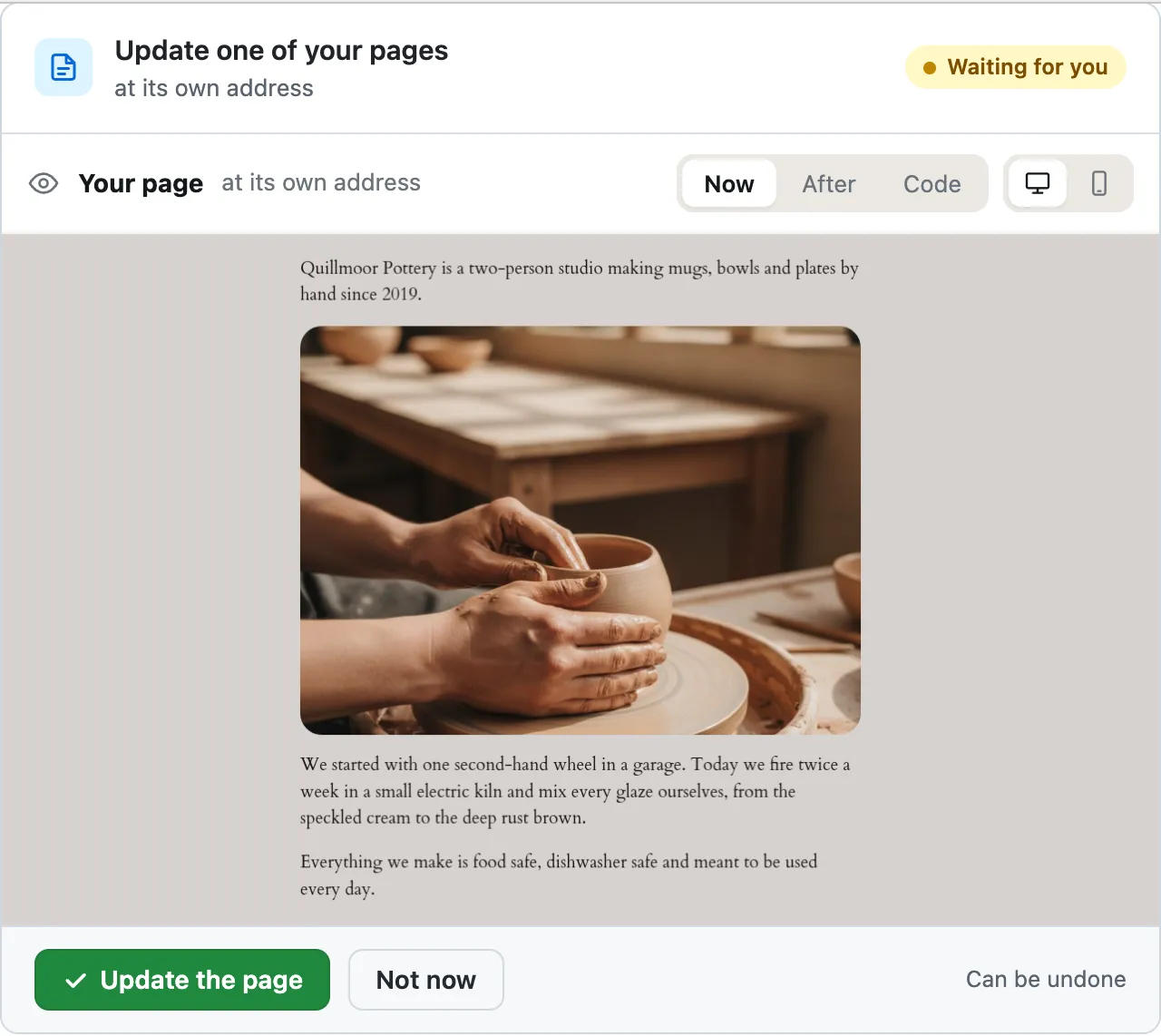
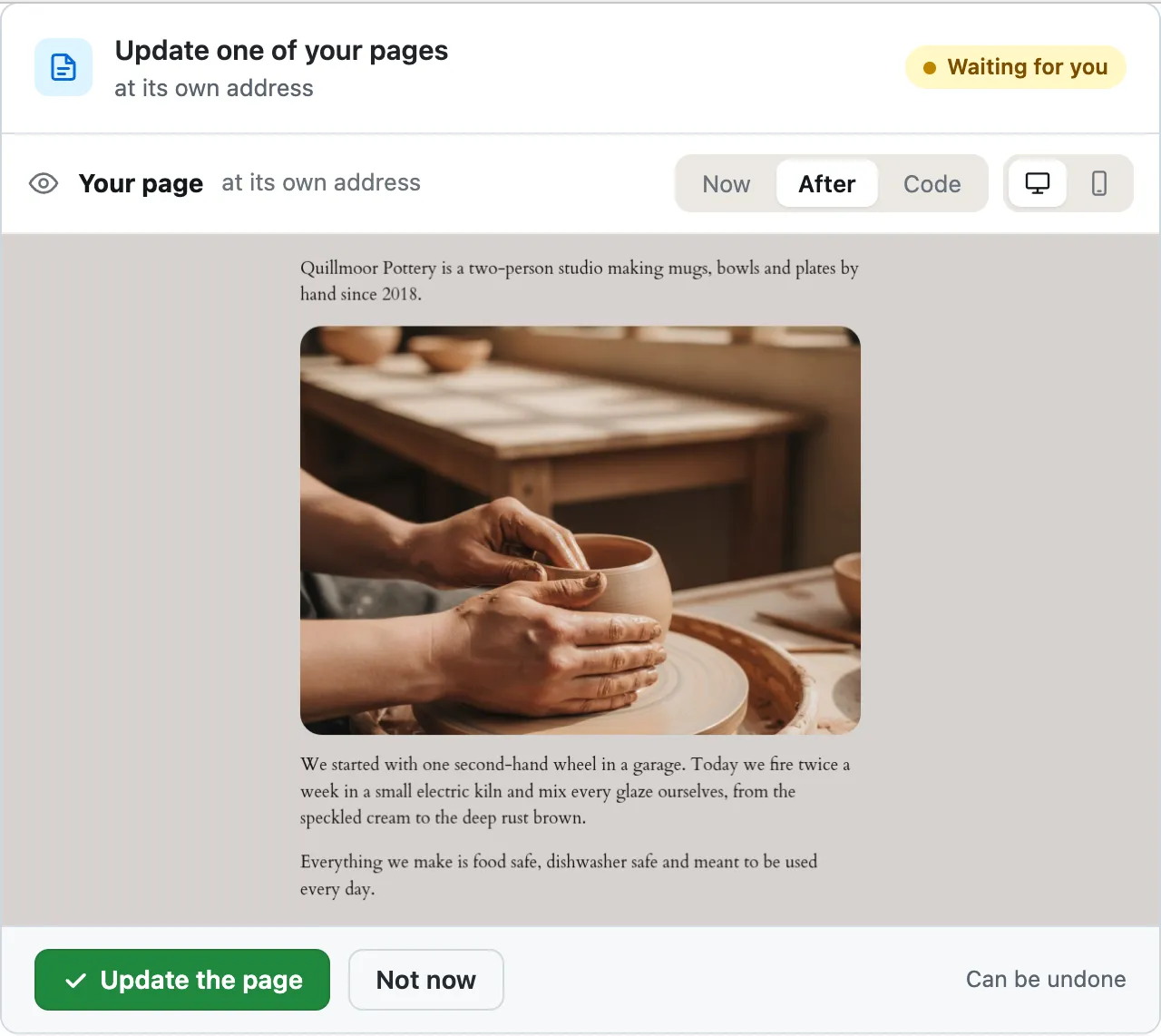
- <!-- wp:paragraph -->
- <p>Quillmoor Pottery is a two-person studio making mugs, bowls and plates by hand since 2019.</p>
- <p>Quillmoor Pottery is a two-person studio making mugs, bowls and plates by hand since 2018.</p>
- <!-- /wp:paragraph -->
- <!-- wp:image {"id":28,"sizeSlug":"large","linkDestination":"none","className":"is-style-rounded"} -->
Ready for you to review — it's on the About page, and the wording elsewhere on the page is untouched.
A real run on our test site, Oct 11, 2026. From asking to done, it took 38 seconds. Go through it step by step
How it differs
| CMSHands | Writing tools | MCP bridges | |
|---|---|---|---|
| Where you ask | A chat in your WP dashboard, the screens you log in to at yoursite.com/wp-admin | Inside the block editor, while a post or page is open1 | A separate app, linked to your site by a plugin2 |
| What it's for | Site jobs: words on pages, header and footer on block themes, plugins, health reports | Writing posts, pages, lists and tables, making images, fixing spelling and tone1 | Letting that app find and run the abilities your plugins, theme and WP offer2 |
| What it can change | Pages, posts, the header and footer on block themes, plugins from the WP plugin directory. Not menus or widgets | The post or page you have open in the editor1 | Only the abilities a plugin makes public. They're private by default2 |
| Before and after a change | A card shows exactly what would change. Nothing happens until you press. Undo puts it back | The text lands in the editor. You edit it and publish it yourself1 | A permission check for each ability. The page we read doesn't describe approval or undo2 |
| Checks on your site | A health report when you ask. On the free plan, a check once a day, and at once if it crashes | Not listed on the page we read1 | Not described on the page we read2 |
Where you ask
What it's for
What it can change
Before and after a change
Each kind of tool as one example's own page describes it, read Oct 14, 2026. CMSHands facts are from our test site.
- 1. jetpack.com/ai, Oct 14, 2026
- 2. github.com/WordPress/mcp-adapter, Oct 14, 2026
CMSHands is not affiliated with the makers of the tools in these sources. Their names are trademarks of their owners.
Watch it do this on a real site
You ask
You type the change in the chat, in your own words. The chat sits in your WP dashboard, next to your pages.
You ask
You type the change in the chat, in your own words. The chat sits in your WP dashboard, next to your pages.
On the About page, change “since 2019” to “since 2018”.
You see it first
It finds the About page, reads it, and about 29 seconds later shows a card, a box in the chat that shows exactly what would change. It opens on After: your page with the new words. Nothing has changed yet.
On the About page, change “since 2019” to “since 2018”.
- Looking for what you meant1.8 s
- Reading one of your pages3.9 s
- Preparing the change for your OK5.5 s
- Previewing your page5.7 s
- <!-- wp:paragraph -->
- <p>Quillmoor Pottery is a two-person studio making mugs, bowls and plates by hand since 2019.</p>
- <p>Quillmoor Pottery is a two-person studio making mugs, bowls and plates by hand since 2018.</p>
- <!-- /wp:paragraph -->
- <!-- wp:image {"id":28,"sizeSlug":"large","linkDestination":"none","className":"is-style-rounded"} -->
Ready for you to review — it's on the About page, and the wording elsewhere on the page is untouched.
Or see the exact words
Press Code to see the change itself: the old sentence in red, the new one in green. Now shows the page as it is today. The green button makes the change. Not now leaves the page alone.
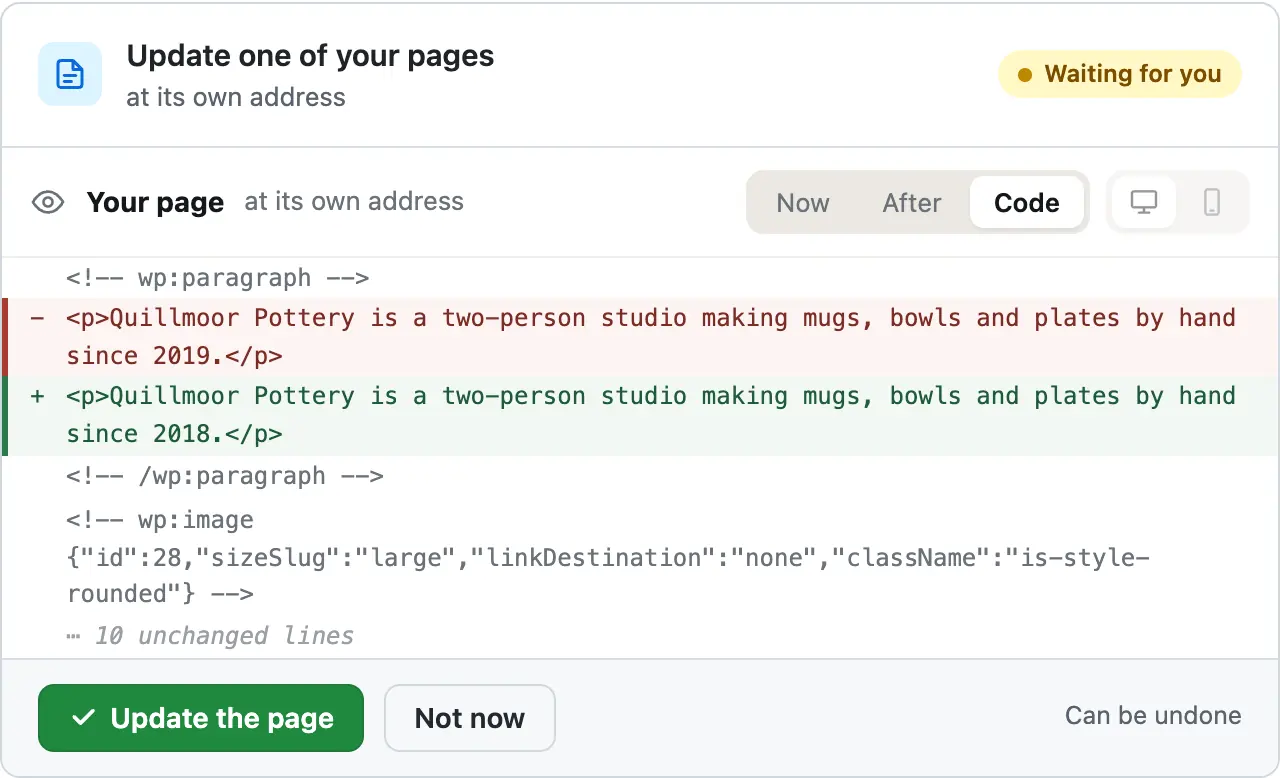
You press the button
Only now does it change your page. It updates the About page, reads it back to check, and the card turns green with an Undo link.
- Updating one of your pages37 s
- Checking the change38 s
Done. I checked afterwards, and it now says "Quillmoor Pottery is a two-person studio making mugs, bowls and plates by hand since 2018.".
It's on the site
The About page on the test site right after, seen by a visitor: the first line now ends in 2018. Nothing else on the page moved.
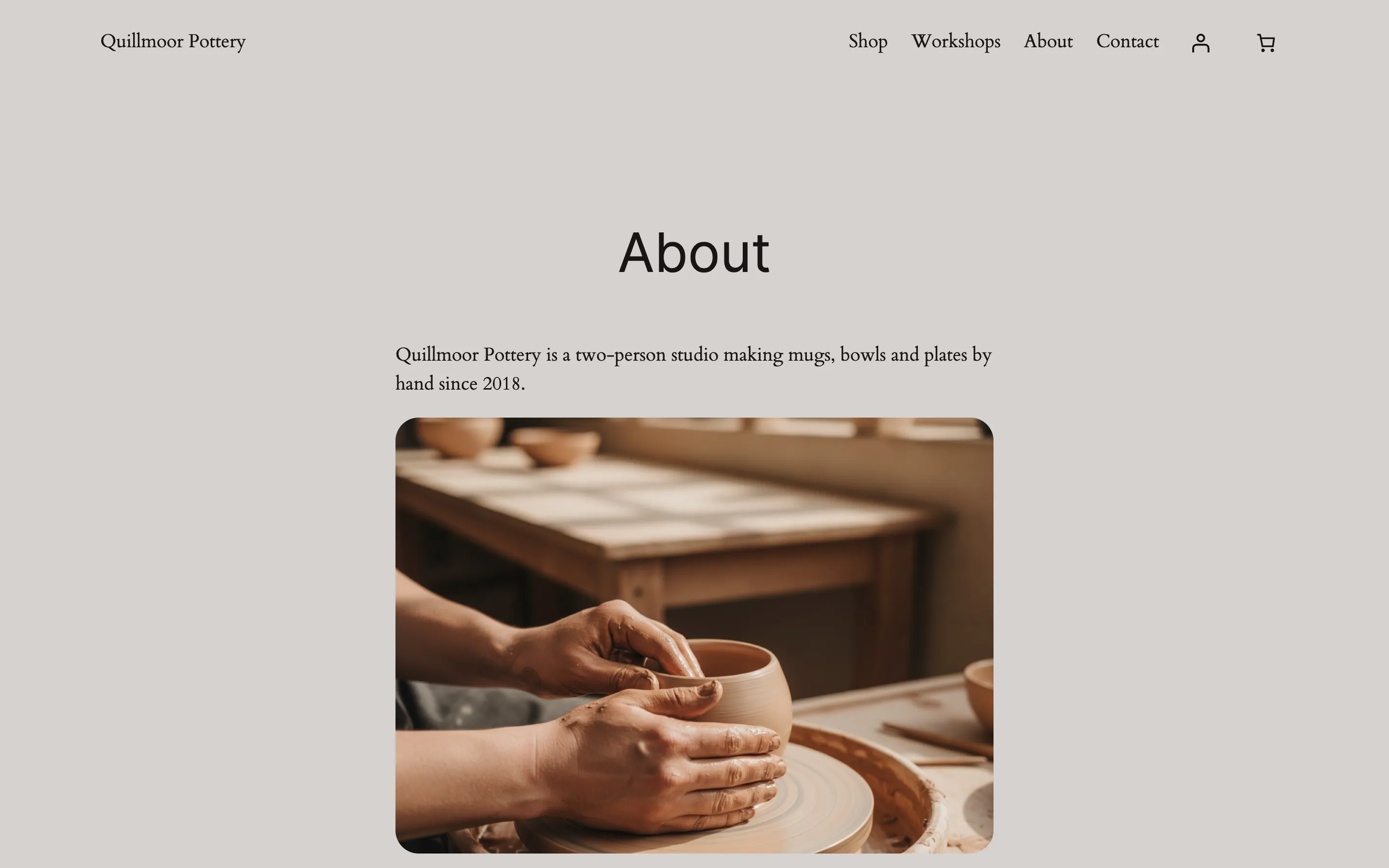
Undo, if you want
One press of Undo put the old sentence back. It checked again and showed exactly what it put back.
- Reverting the change45 s
- Checking the change46 s
Undone. I checked afterwards, and it's back the way it was.
Quillmoor Pottery, WP 7.1.3, Twenty Twenty-Four. Step times count from the moment the request was sent.
- It changes words on your pages and posts. A card, a box showing exactly what would change, comes first.
- It updates a plugin from the WP plugin directory, checks your site, and puts the old version back if the site got worse.
- Ask for a health report. On our test site it answered in under 8 seconds and changed nothing.
More it does here (5)
- It writes a new page or blog post for you. Undo removes it.
- It installs plugins from the WP plugin directory. Undo switches the plugin off and deletes it.
- On block themes it edits the header and footer, and adds or moves blocks. Undo puts them back.
- On the free plan it checks your site once a day, and at once if it crashes.
- If your site crashes, it finds the cause and a person at CMSHands approves the repair. Install it before anything breaks.
Why it won't wreck your site
- Nothing changes until you press the button. Every change comes as a card that names it. Nothing happens until you press the button or Not now.
- You see it first. Old words in red, new words in green. For layout, before-and-after pictures on a computer and a phone.
- One click undoes it. When something can't be undone, like deleting a page or a plugin, the card says so before you press.
- Updates put themselves back. After a plugin update it checks your site. If the site got worse, the old version goes back on its own.
- A person checks every repair. When your site is down you can't reach the chat, so a person at CMSHands approves the fix before it runs.
What it won't do here
- It can't be installed into a site that is already down.A plugin can't run on a site that won't load. Install it while your site works, so the next crash is caught.
- Repairs wait for a personWe prepare the fix, and a person at CMSHands approves it before it runs. Only on sites that had CMSHands before they broke. Hosts differ.
- Not menus, widgets or page-builder pagesIt edits pages, posts, and the header and footer on block themes. Menus, widgets, theme settings and page-builder pages stay with you.
- Premium pluginsInstalls and updates cover the WP plugin directory, the free plugins at wordpress.org. A plugin you bought updates through its maker.
- Header and footer on older themesOn an older (classic) theme, a theme with Appearance › Customize instead of Editor, it can't change the header or footer.
Free to start
- No account
- 3 to try it
- With your email
- 10 every month
- Paid plan
- Coming. Nothing costs money until you choose it.
A change is one card you approve. A job that touches several pages or plugins is several changes.What's free
Questions
Is there a help chat inside WordPress?
Not one that comes with WP. Help lives in the docs at wordpress.org/documentation and the forums at wordpress.org/support. CMSHands adds a chat: a free plugin that puts it in your dashboard, the screens you log in to at yoursite.com/wp-admin. Ask a question, or ask for a change. A change shows as a card first, and nothing happens until you press.
Can a plugin update my other plugins and check my site after?
Yes. CMSHands updates one plugin from the WP plugin directory at a time, checks your site after, and puts the old version back if it got worse. On our test site, a WP site we run to try every task before we write about it, we broke Contact Form 7 6.2.1 on purpose. It found the errors and put 6.1.7 back on its own. Whatever you use, update one plugin at a time and load your home page after each.
Does it work with my theme?
For words on pages and posts, yes. Header, footer and styling changes need a block theme, the newer kind of WP theme. To check yours, open Appearance in your dashboard. A block theme shows Editor. An older (classic) theme shows Customize instead, and there the header and footer stay with you.
What happens if my site crashes?
If CMSHands was on your site before the crash, it reads your error log for the cause, and a person at CMSHands approves the repair before it runs. We tried this on our test sites; hosts differ. If it wasn't, it can't be installed into a site that won't load. Then open your host's file manager and rename the folder of the plugin you changed last, in wp-content/plugins.
Is it free?
To start, yes: 3 changes with no account, then 10 a month once you add your email. Questions are free, up to 30 a day (100 with your email).
Written by CMSHands team.
Try it on your own site
- Nothing changes without your OK
- Undo in one click, or a warning first
- No account, no password to share